Aviation operations platform

More time flying. Less time managing.

Bring your aircraft, people and daily operations together with Aircraft Steward. Built for flight schools, flying clubs, aircraft partnerships and rental fleets.

Already using Aircraft Steward? Sign in

  • One calendar for every aircraft and every instructor
  • Dispatch and check-in with meters that stay honest
  • Pilot documents read, then approved by a person
  • Seventeen reports that export to real Excel workbooks
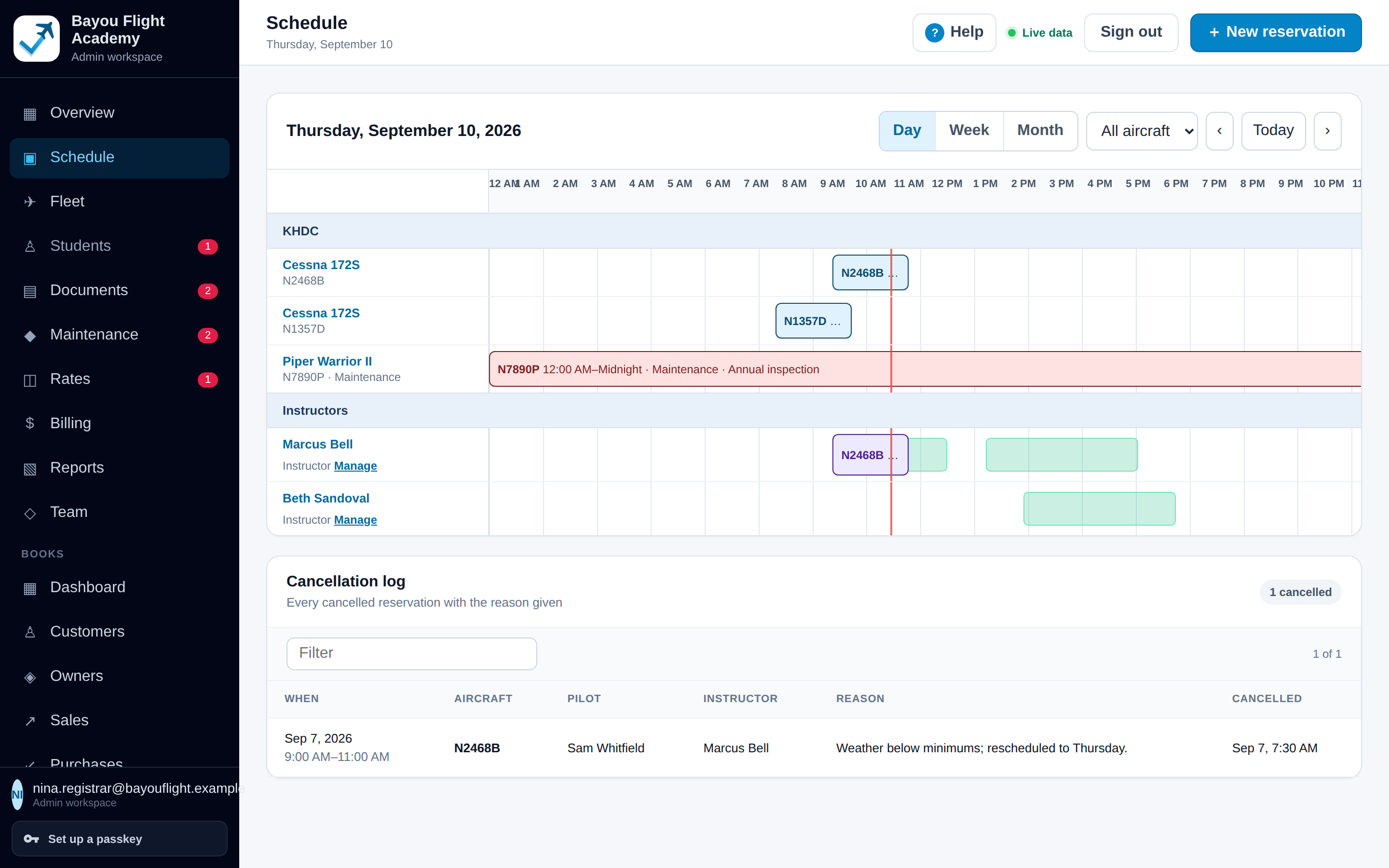
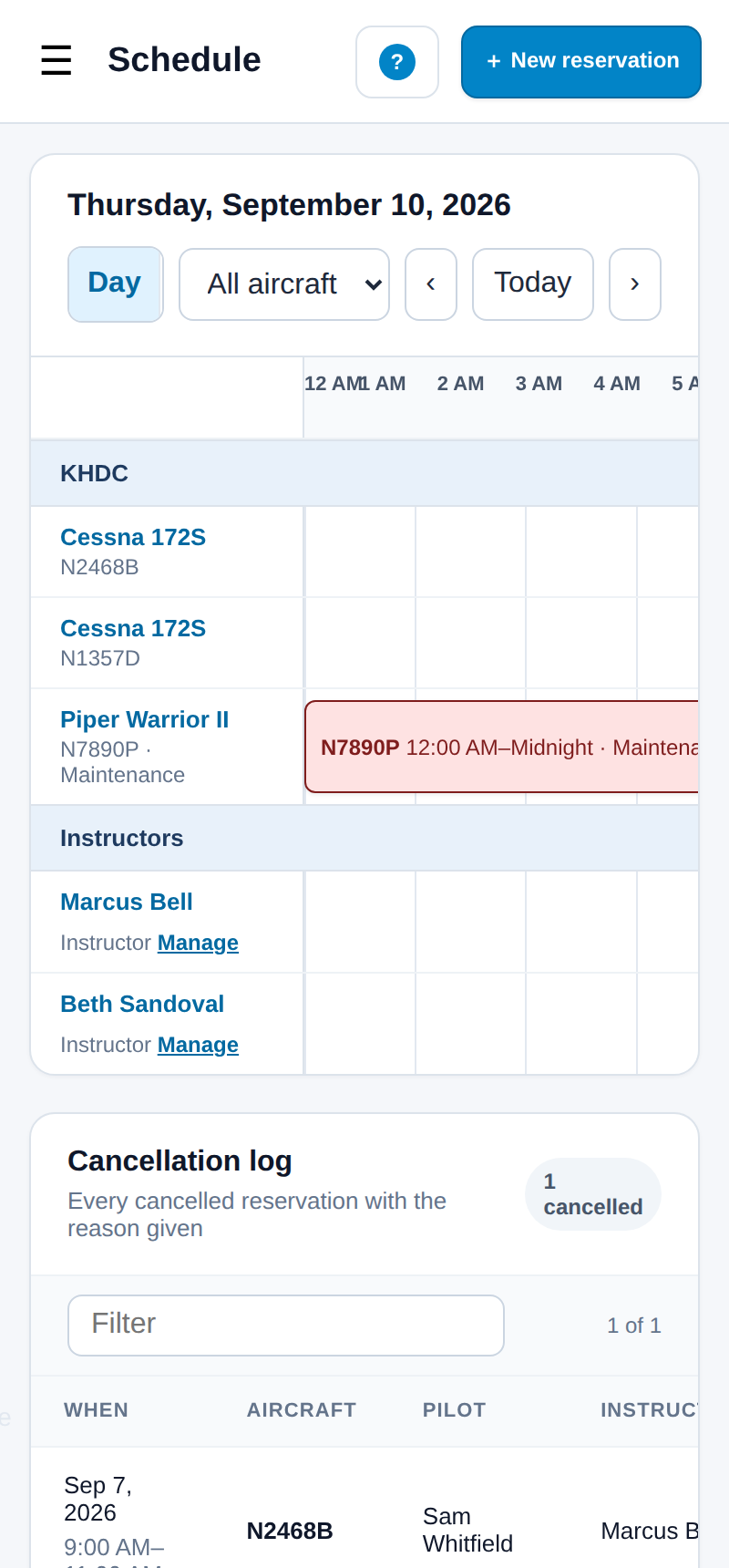
Schedule page, day view, for Bayou Flight Academy, a fictional school: rows for two Cessna 172S and a Piper Warrior, a red maintenance bar across the Warrior's day, and two instructor rows with green availability bands and a purple lesson block.
The schedule for a fictional flight school: one row per aircraft and one per instructor. Green bands are published instructor availability, the purple block is a lesson, red is an aircraft in the shop.

See it in 95 seconds

The schedule, booking a lesson, dispatch and check-in, student documents, reports, help and Books, narrated over the real product with fictional data.

Every screenshot on this page shows the real product with fictional organizations, people, aircraft and figures. The film is a flight-school cut; Books appears as "when you're ready" and is a preview in this release. Pressing Play loads the player from YouTube; nothing is requested from it before that.

Who it's for

Four kinds of operation, one workspace. Pick yours to see the example that fits; the product itself is the same for everyone.

Flight schools

The problem. Aircraft, instructors and students have to line up every day, and a lapsed medical or a forgotten squawk shows up at the worst moment.

What changes. One schedule for aircraft and instructors, student records that turn amber before they lapse, dispatch and check-in that keep the meters honest, and reports that go straight to Excel.

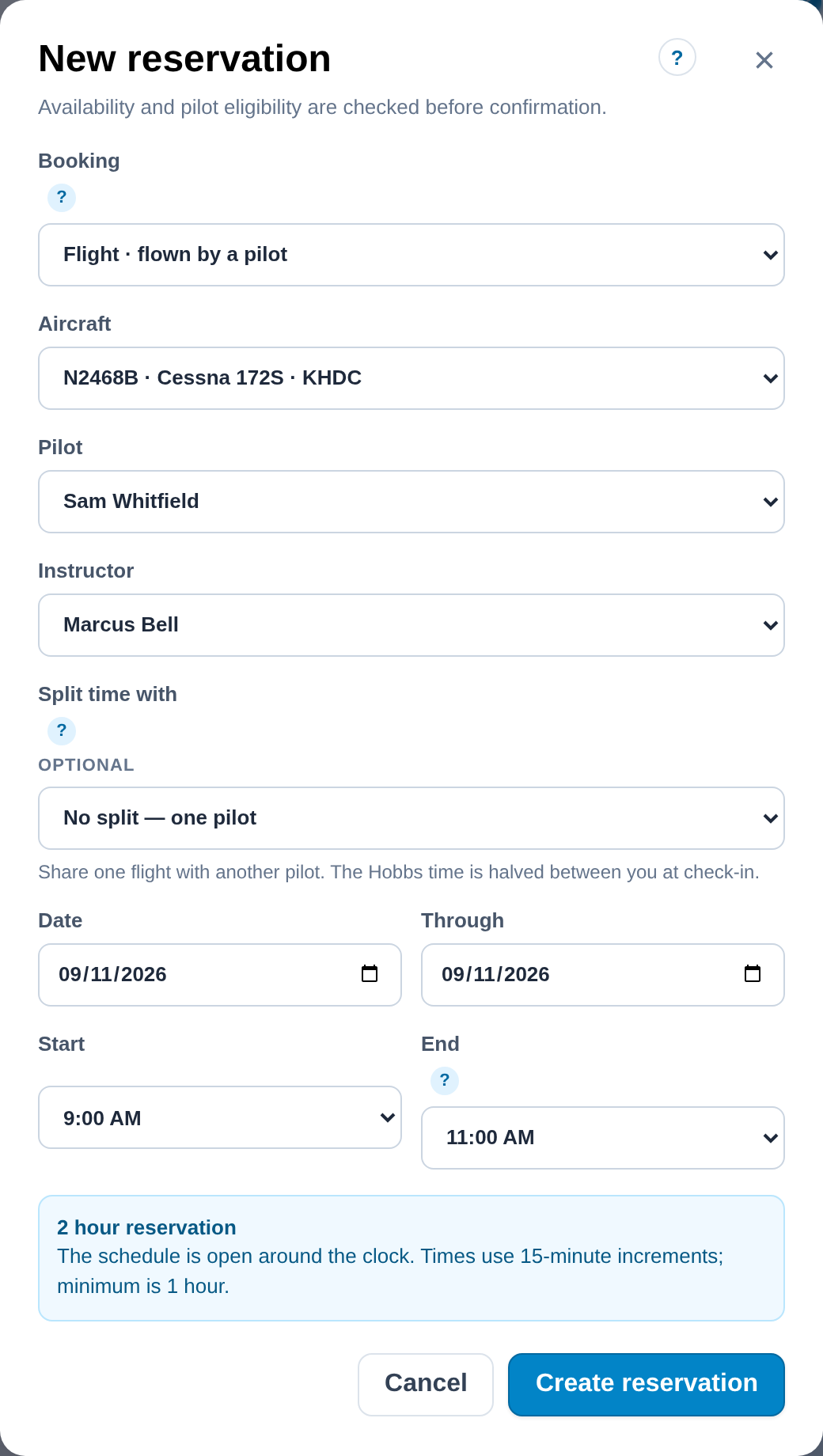
For example. Book a lesson with the aircraft, the student and the instructor in one dialog. If either is already booked, the dialog says so before it saves.

New reservation dialog with aircraft N2468B, pilot Sam Whitfield and instructor Marcus Bell chosen, date and time fields, and a note reading 2 hour reservation.

The platform

Aircraft, people, scheduling, documents, maintenance, billing and ownership in one organized workspace. Each capability below carries its availability in the current release.

Available now Available when configured Included · preview Planned

Run the day

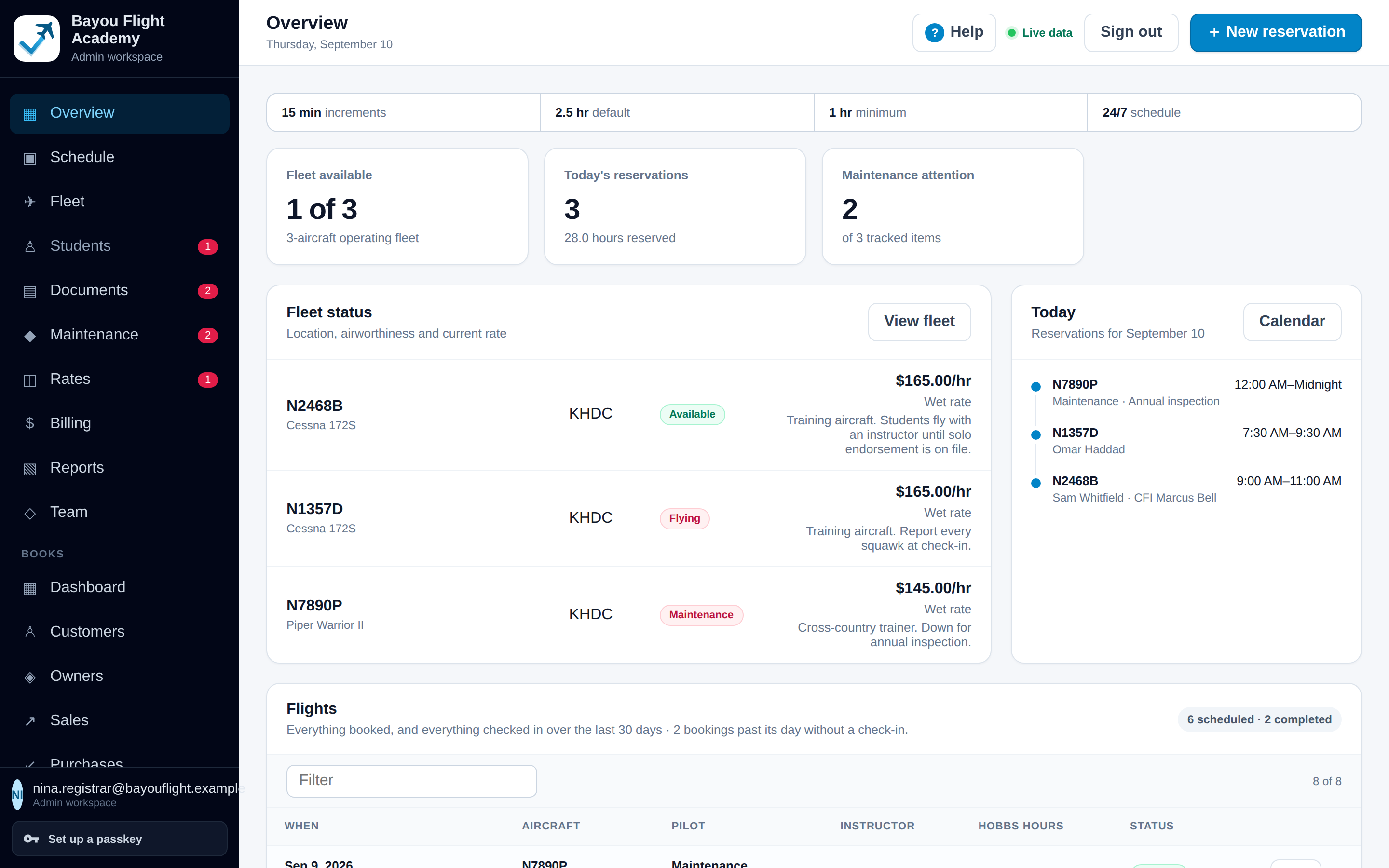
The schedule, the fleet and every flight, on one screen for everyone who signs in.

One schedule for every aircraft and every instructor

Available now

Day, week and month views with one row per aircraft and one per instructor. A booking that would double-book either is refused before it saves.

  • 15-minute increments, a 2.5-hour default and a 1-hour minimum, on a schedule open around the clock, including bookings past midnight
  • Conflict detection by aircraft and by instructor
  • Maintenance blocks that put an aircraft out of service for hours or days, shown in red to everyone in the organization, with hours charged to no one
  • Instructor availability published per day, drawn as green bands on the instructor's row, and a cancellation log with the reason given
Schedule page, day view, for Bayou Flight Academy, a fictional school: rows for two Cessna 172S and a Piper Warrior, a red maintenance bar across the Warrior's day, and two instructor rows with green availability bands and a purple lesson block.
Day view for a fictional school. Green is published instructor availability, purple is a lesson, red is an aircraft in the shop.

Each aircraft's operating information in one place

Available now

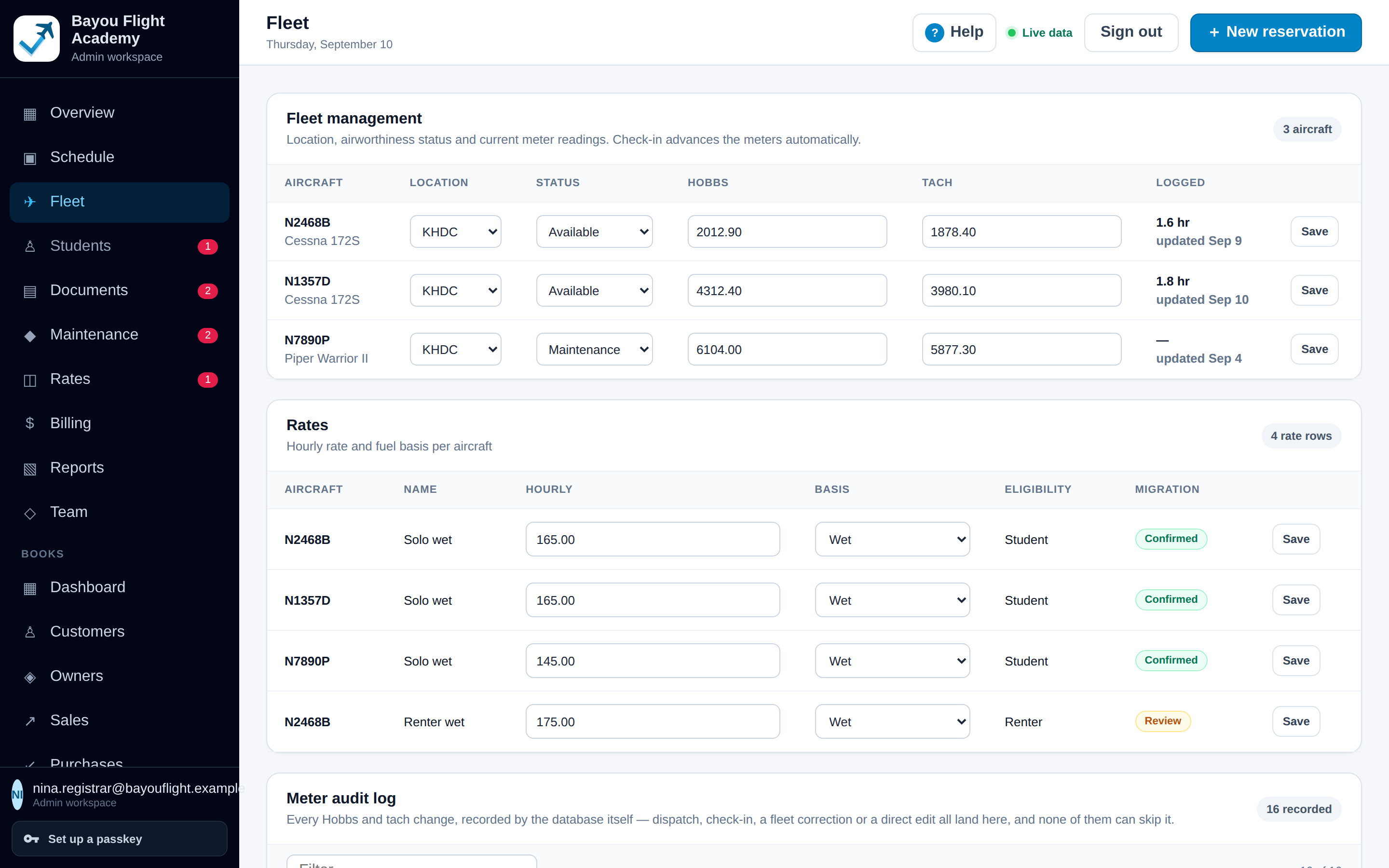
Model, base, status, current Hobbs and tach, and the rate that applies, with every meter change written to an audit log by the database.

  • Fleet page with status (available, flying, maintenance, grounded) that the schedule and Overview reflect
  • Current meters kept by dispatch and check-in; administrators can correct a reading, and the correction is logged too
  • Append-only meter audit: the reading before and after, who changed it and when
  • Aircraft with maintenance or grounded status can only be booked as a maintenance block
Fleet page listing each aircraft with base, status, current Hobbs and tach, and rate, with the meter audit table below.
The fleet list with base, status, current meters and rate; the meter audit sits below it.

From dispatch to check-in without typing anything twice

Available now

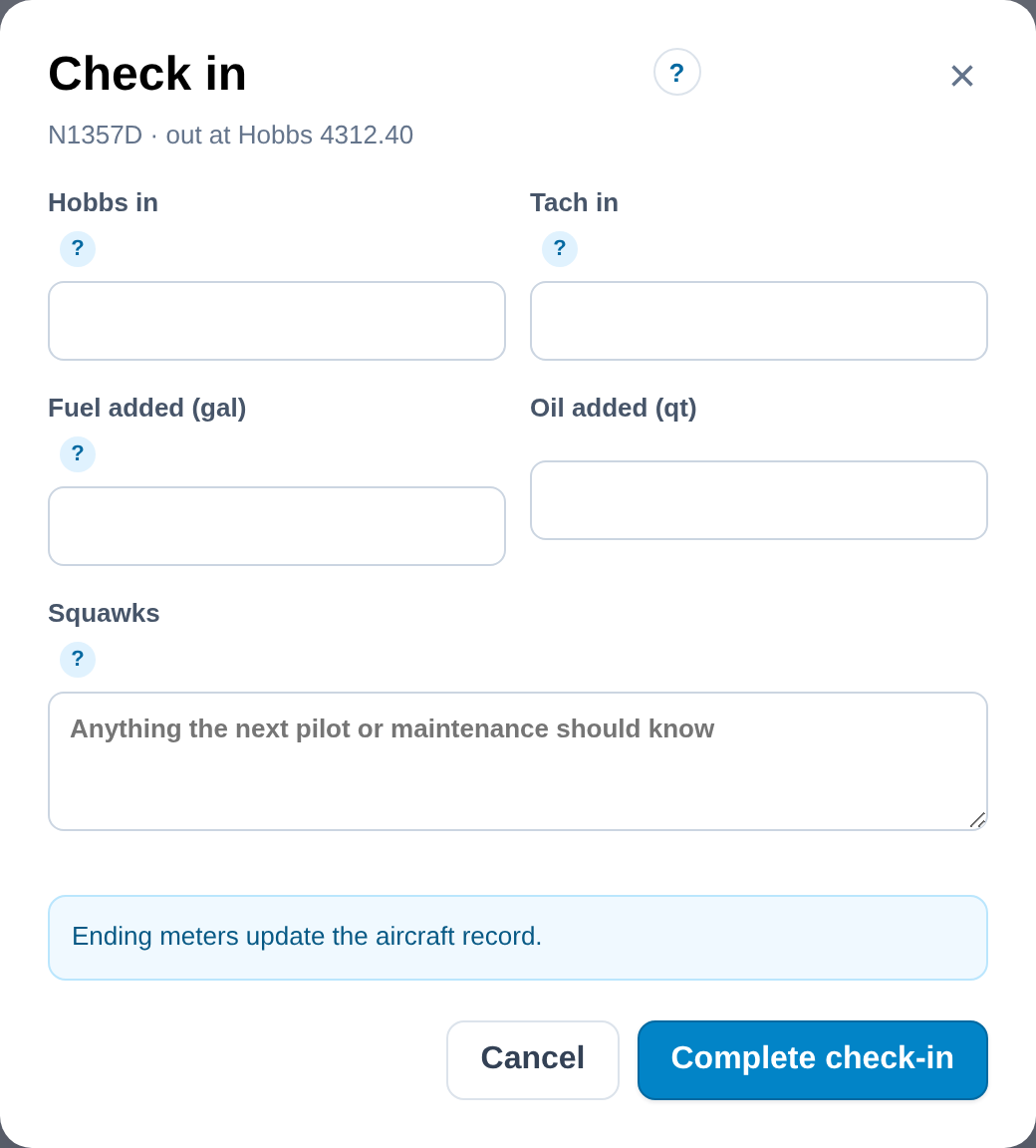
Dispatch pre-fills the Hobbs from the aircraft record. Check-in takes Hobbs and tach in, fuel and oil added, and squawks, then updates the aircraft and prices the flight.

  • The hours line updates as the meters are typed; split flights halve the time between two pilots at check-in
  • Squawks entered at check-in appear on Maintenance as open items
  • Every checked-in flight is listed on the Overview, on the pilot's My flights, and on Billing priced against the rate catalogue
  • Ground runs, test flights and ferries on a maintenance block advance the meters without reaching anyone's account
Check-in dialog for N1357D, out at Hobbs 4312.40: fields for Hobbs in, tach in, fuel added, oil added and squawks, and the note Ending meters update the aircraft record.
Check-in for a fictional aircraft: meters, fuel, oil and squawks in one dialog.

See what is due and what was squawked

Available now

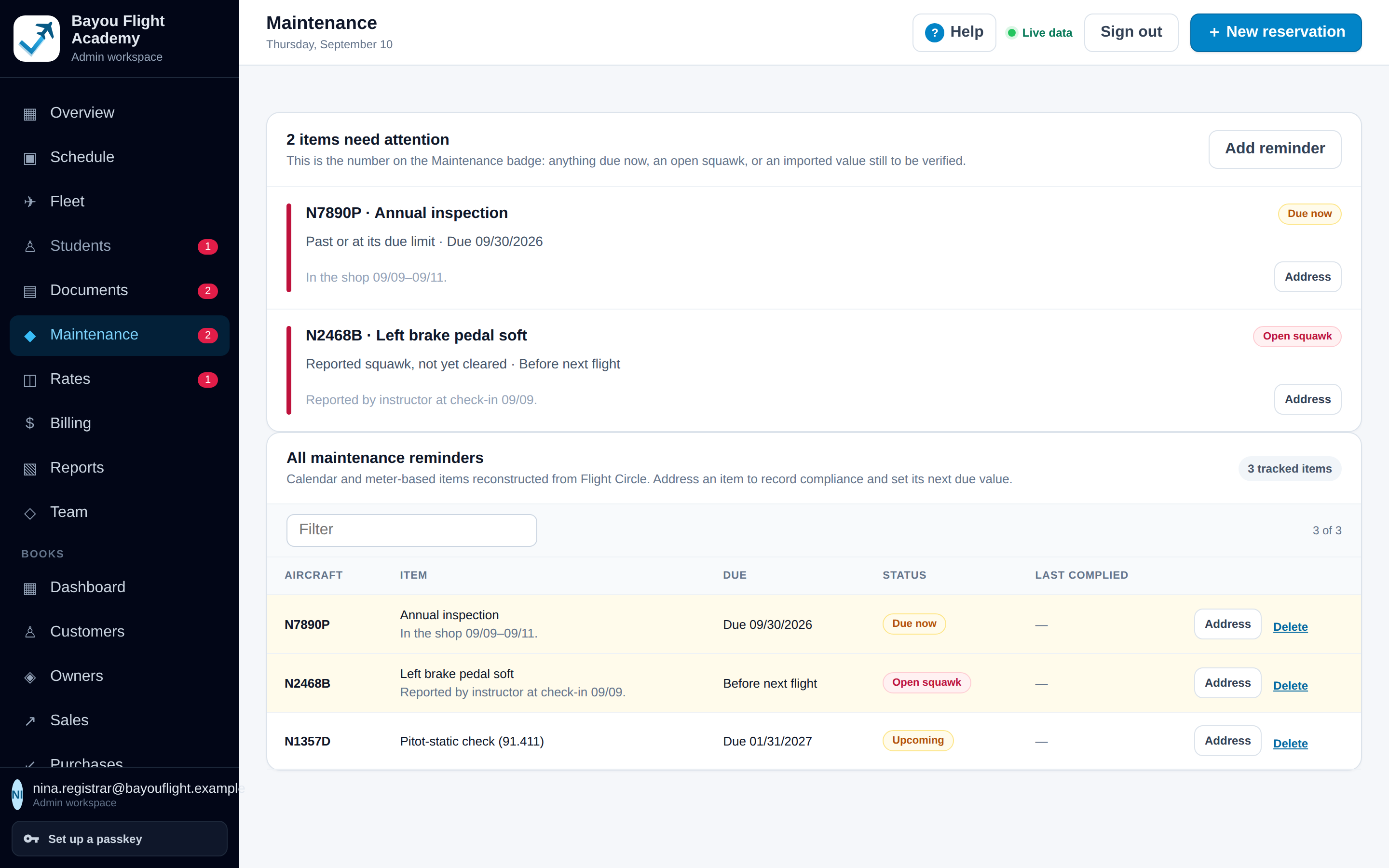
Reminders by date, by meter reading, or both. Open squawks, items due now and imported values still to be verified are counted on the Maintenance badge.

  • Record compliance on an item and set its next due date or meter value
  • Squawks from check-in become open items with who reported them and when
  • Maintenance blocks on the schedule, for one day or several, with a reason
  • Values imported from a previous system are flagged until someone verifies them against the logbook

Reminders show what the organization recorded. They do not determine airworthiness or guarantee regulatory compliance. Work orders and shop management are not part of this release.

Maintenance page: 2 items need attention, an annual inspection due now on N7890P and an open squawk on N2468B (left brake pedal soft, reported at check-in), then the table of all reminders with due dates and status.
Two items need attention for a fictional school: an annual due now and an open squawk from check-in.

Keep people and their paperwork current

Records that say what needs attention before the next booking, and documents that arrive from a phone and are confirmed by a person.

Know who is current before the next booking

Available now

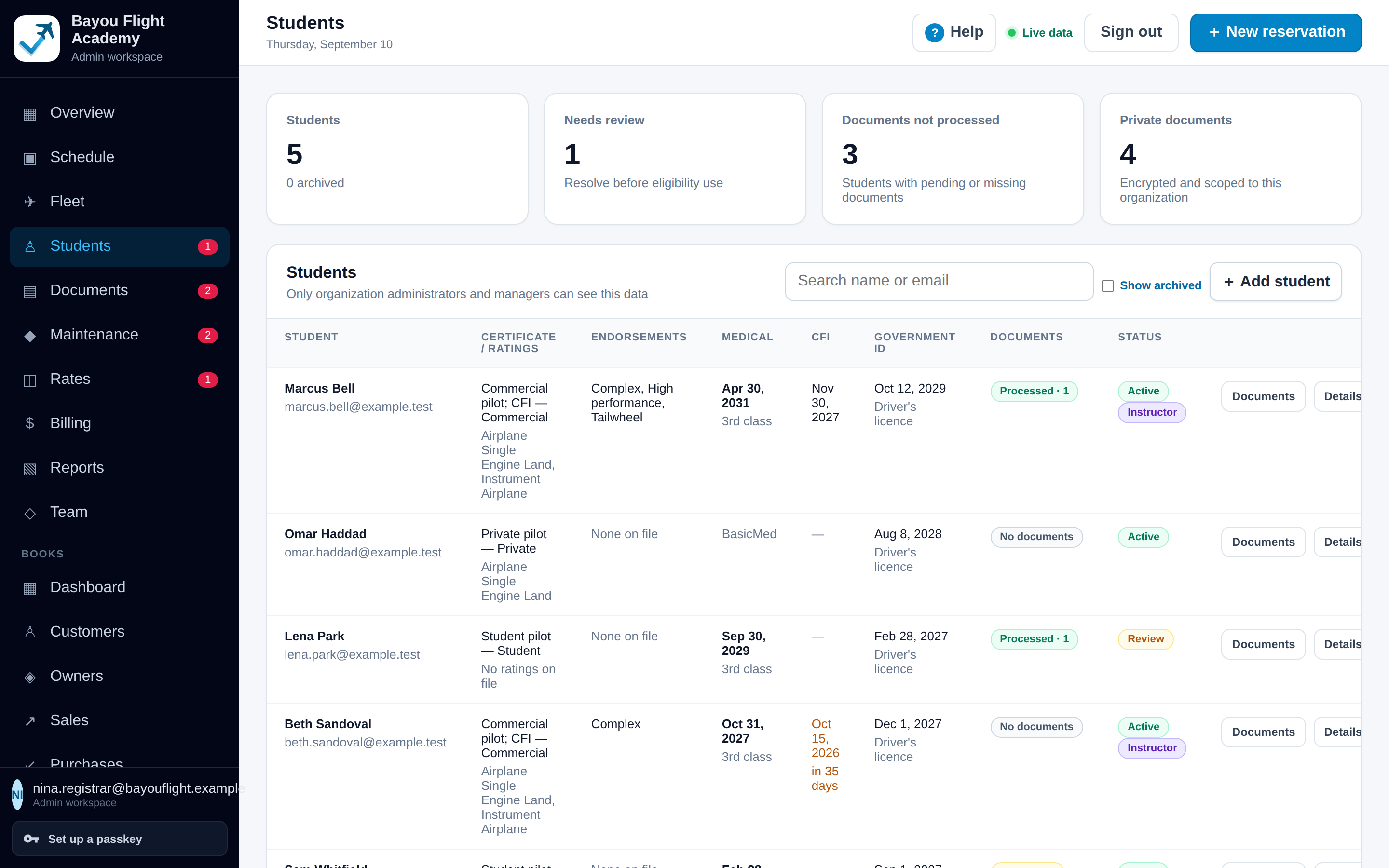
A roster with certificate and ratings, endorsements, medical, instructor certificate expiry, government ID and document status. Expiring turns amber within 60 days; lapsed turns red.

  • Medical validity computed from class, exam date and date of birth under 14 CFR 61.23(d); BasicMed and other non-computable classes are shown as recorded
  • Roles for staff (administrator, manager, instructor, bookkeeper, maintenance) and a portal for pilots, students and members
  • A required-documents checklist the organization defines, shown on every portal
  • Your own wording: Customers, Members or Students, throughout the interface and the reports

Qualification tracking is information for the people who run the operation. It does not establish legal flight eligibility, and a booking is not blocked by a lapsed medical or a missing document.

Students page: metrics for students, needs review, documents not processed and private documents, then a roster with certificate and ratings, endorsements, medical, CFI expiry, government ID, document status and status badges. One CFI expiry is shown in amber, 35 days out.
The roster for a fictional school. One instructor's certificate expiry is amber, 35 days out.

Scattered files become organized, reviewable records

Available now

Upload a whole export or one file at a time. Extraction proposes the values with a confidence score; a staff member compares them with the file and approves or rejects. Nothing changes on a record until approval.

  • Bulk import from a Flight Circle export ZIP or its extracted folders: folders matched to people, unsupported files flagged, duplicates skipped, interrupted uploads resumed
  • Front and back of a licence or certificate paired and extracted together; endorsement pages classified, including several endorsements on one page
  • Previews in place, rejection with a reason that guides the next extraction, and a rebuild of the record from approved documents
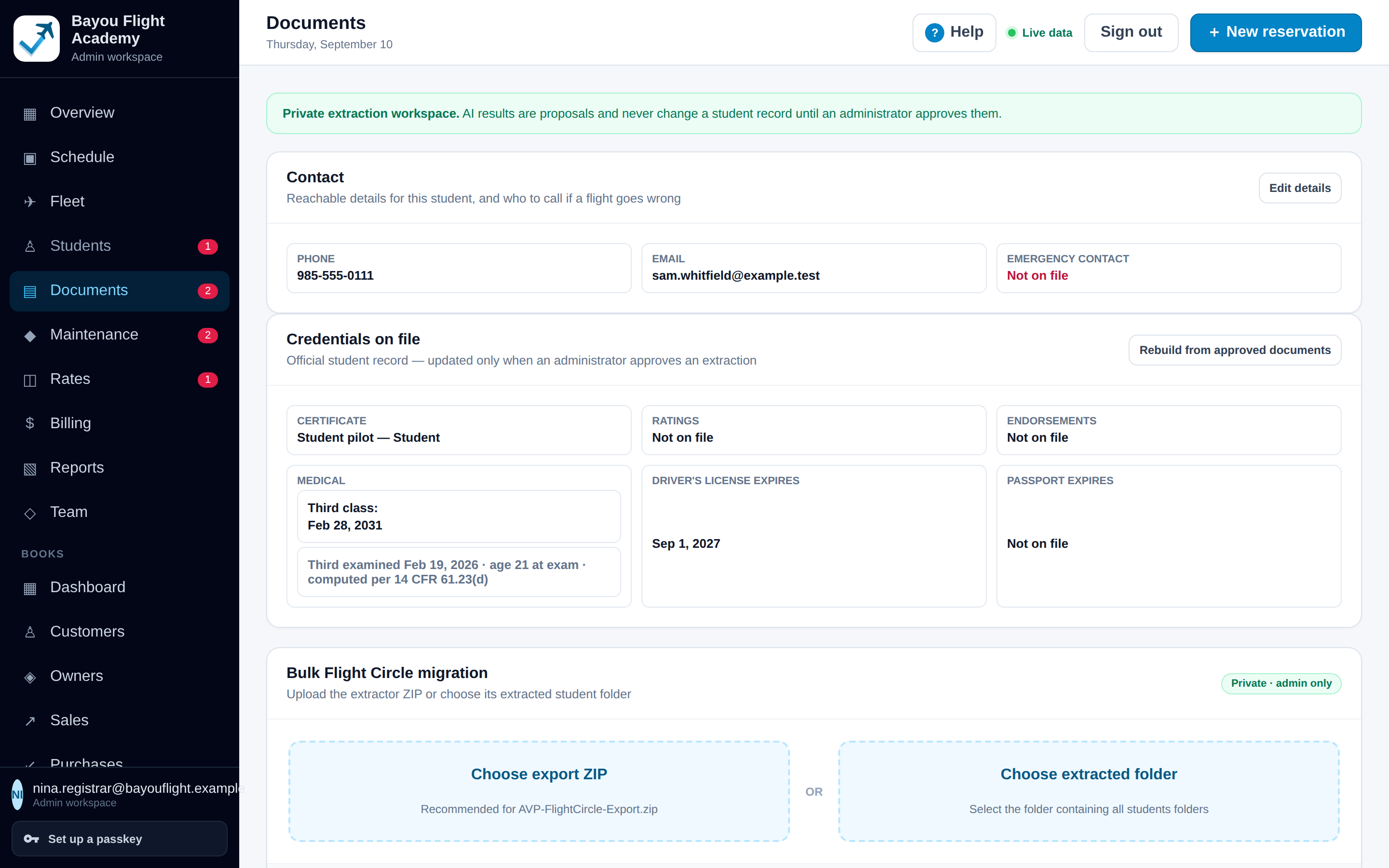
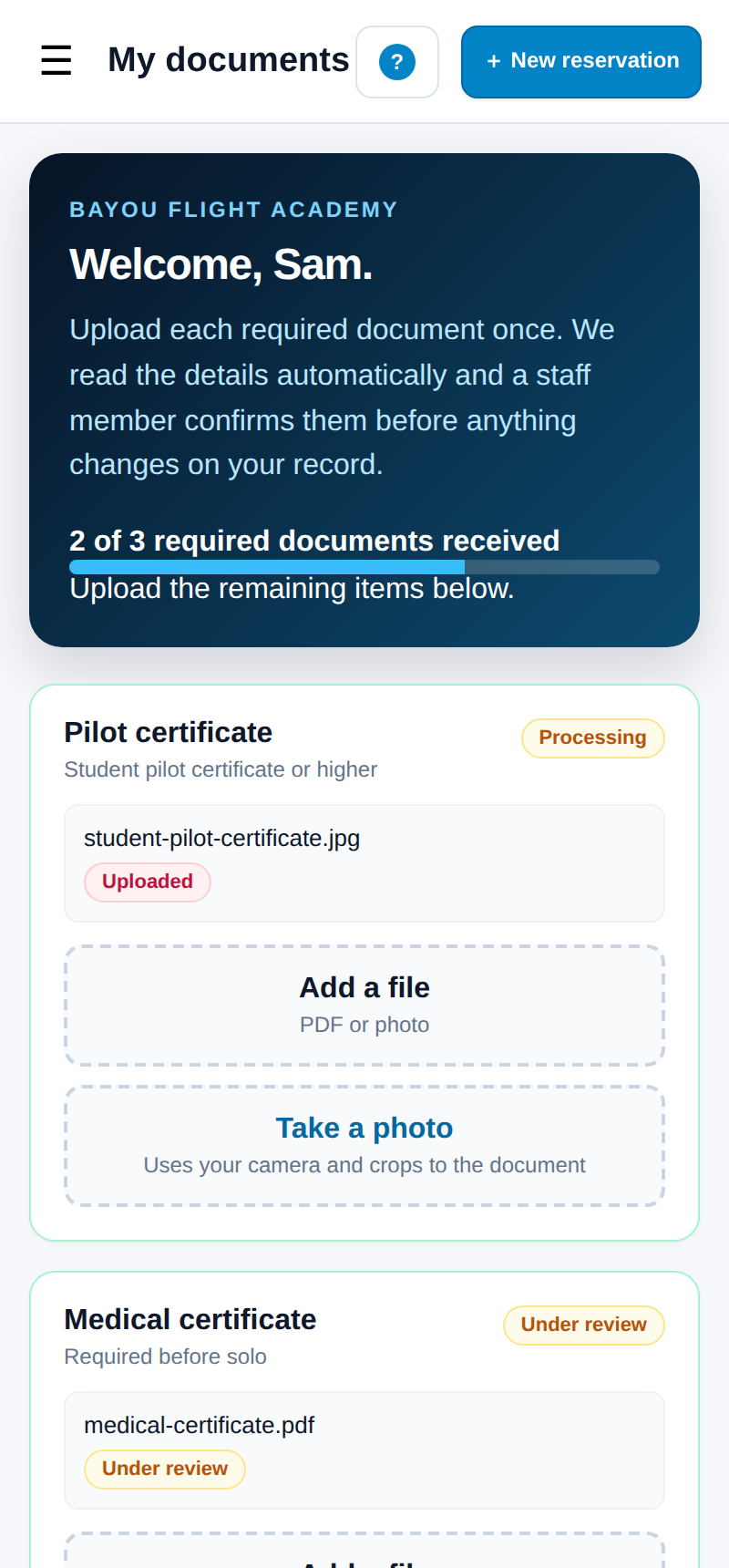
  • Pilots and students upload from a phone: Add a file, or Take a photo with automatic edge detection and crop

Extraction runs through a document reader the deployment configures. Files are stored in a private, organization-scoped bucket; nobody outside the organization's staff and the person themselves can read them.

Documents workspace for one student: contact details, credentials on file with a third-class medical whose validity is computed per 14 CFR 61.23(d), and the bulk Flight Circle migration panel.
My documents on a phone: Welcome, Sam, a progress bar reading 2 of 3 required documents received, and cards for pilot certificate and medical certificate with Add a file and Take a photo buttons.
One student's documents workspace, and the same student's portal on a phone.

Coordinate instructors, students and aircraft

Available now

The pieces a school needs to run lessons on the schedule: an instructor on the booking, published teaching hours, and hours reported as dual or solo.

  • Book a lesson with an aircraft, a student and an instructor; the instructor is checked for conflicts like the aircraft is
  • Instructors publish available windows or block a day out, one day at a time
  • Flight time by pilot reports dual against solo; Instructor time reports hours and who they flew with
  • Instructor certificate expiry on the roster and in the portal's qualifications panel

Not in this release: syllabi, lesson plans, stage checks, grading, student progress records, and weekly repeating instructor availability.

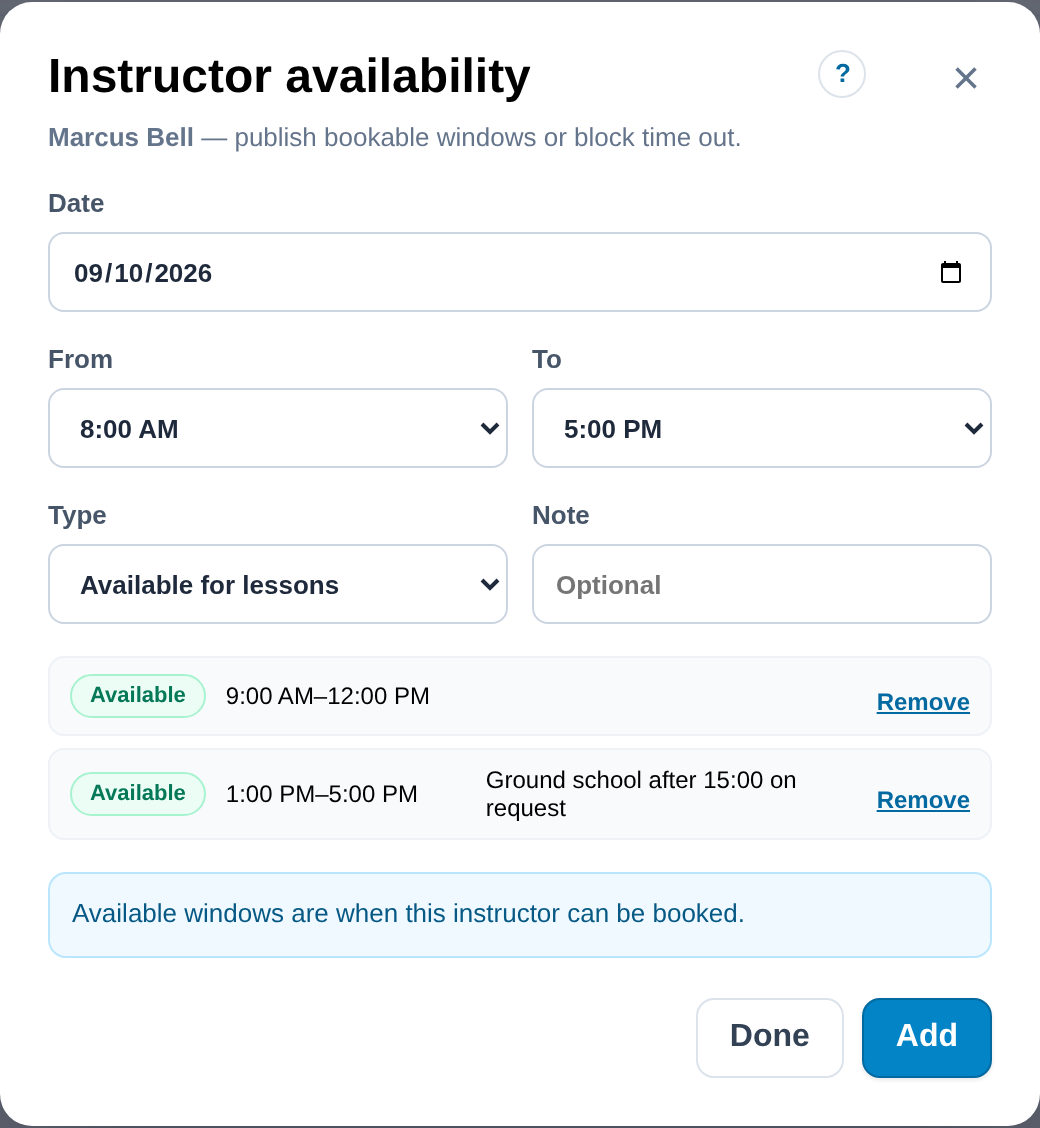
Instructor availability dialog: a date, a window with start and end times, available or blocked, and a note.
An instructor publishes the windows students can book.

See the money clearly

Charges derived from flights, a rate catalogue with review states, and a full set of books when you are ready for it.

Every flight priced, nothing typed twice

Available now

Billing prices each checked-in flight against the aircraft's rate at the time. Maintenance hours are listed separately and charged to no one.

  • A rate catalogue per aircraft with solo and renter wet rates, and confirm, review and retire states for rows brought in from a previous system
  • Flights missing a rate are counted so nothing slips through unpriced
  • Charges, Revenue by aircraft, Revenue by pilot and Maintenance hours reports, exporting to Excel
  • Invoices, payments, credits, prepaid block time and statements live in Books (below)

The Billing page calculates; it does not invoice or collect. There is no online payment or card processing in this release, and charges are not turned into Books invoices automatically.

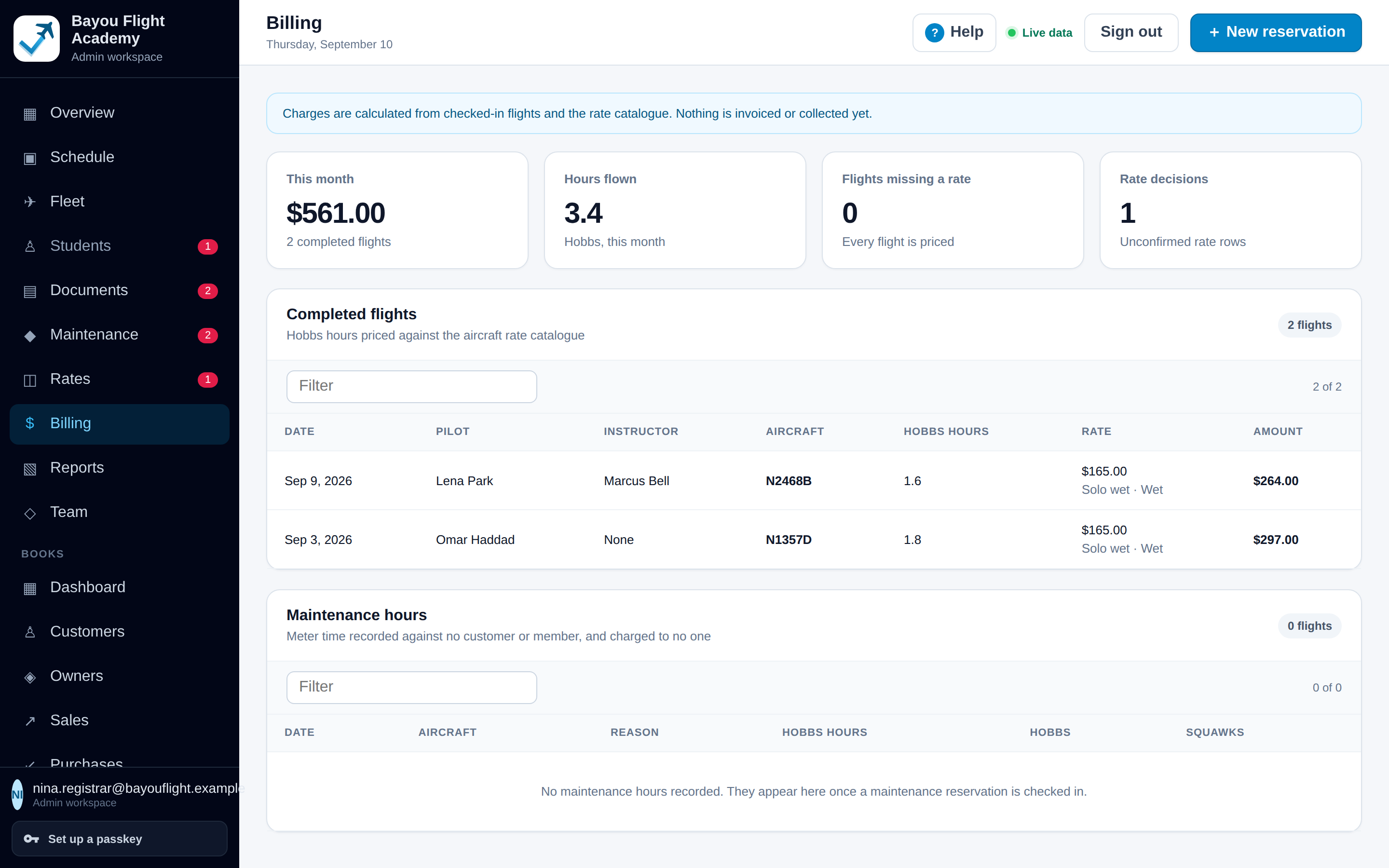
Billing page: a note that charges are calculated from checked-in flights and the rate catalogue and nothing is invoiced or collected here; metrics for this month, hours flown, flights missing a rate and rate decisions; a completed flights table priced per Hobbs hour; and a maintenance hours table.
Billing for a fictional school: completed flights priced per Hobbs hour, and maintenance hours charged to nobody.

A real set of books, in the same workspace

Included · preview

Books is a double-entry general ledger for the organization: customer and member billing, vendors and bills, bank activity, reconciliation and financial reports, with every figure derived from posted entries.

  • Invoices with partial payments, credits, prepaid block time held as a liability until it is flown, recurring dues and statements
  • Vendors, bills and approvals; a bill stays unpaid until a payment is recorded
  • Every write goes through a database function that checks role, entity, open period and balance; a posted entry is corrected only by a linked reversal
  • A full backup export to an Excel workbook, with or without every receipt file, built under the signed-in person's own permissions

Books is installed and usable today and is labelled a preview: an accountant should validate account mappings, opening balances and representative statements before an organization relies on it. It does not move money, file taxes or produce tax-basis capital or K-1 figures.

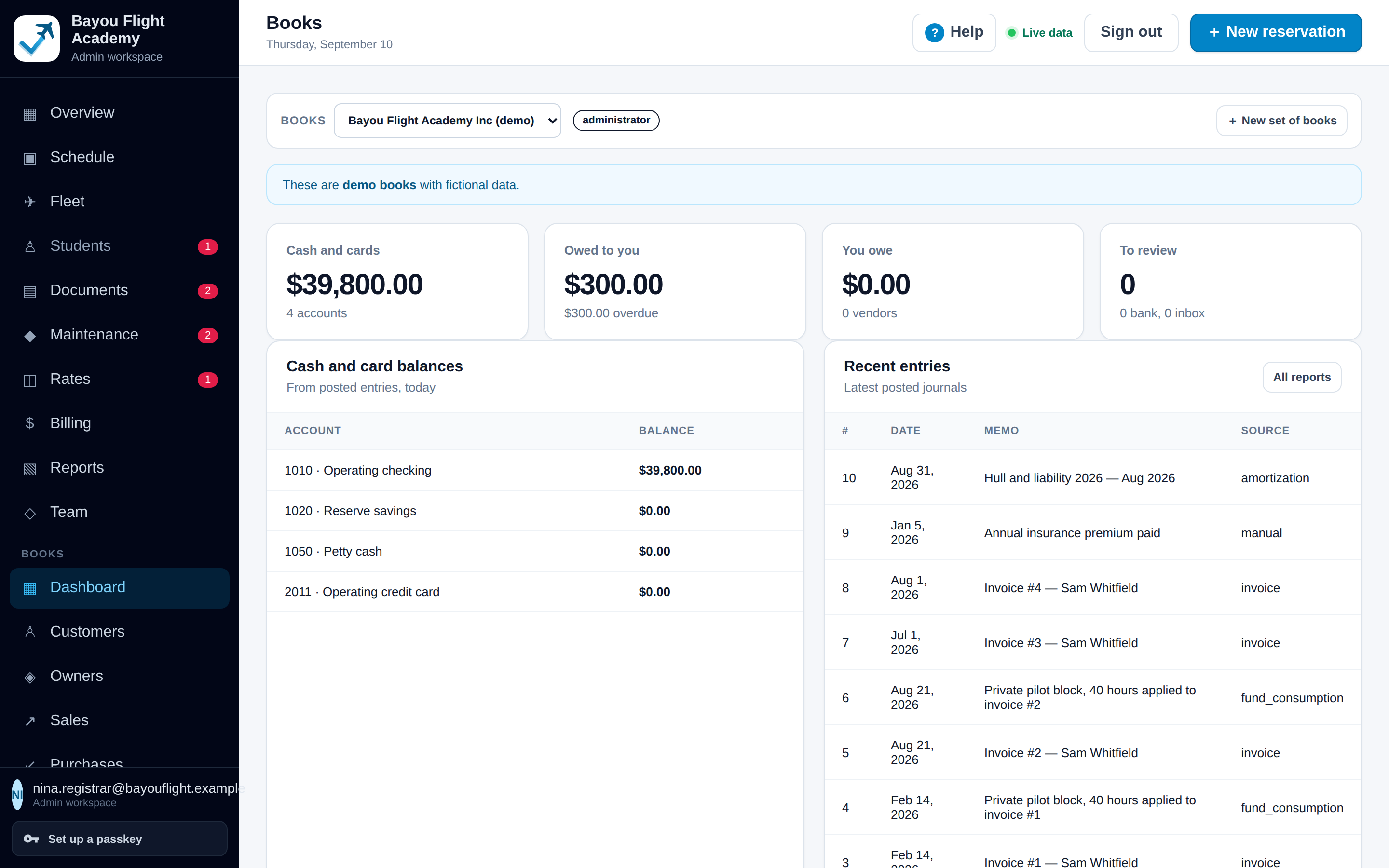
Books dashboard for a fictional school's demo books: cash, receivables, payables and overdue metrics, bank feed and inbox counts, and recent journals.
The Books dashboard for a fictional school's demo books.

Bank activity connected, imported, matched and reconciled

Included · preview

Bring in bank and card activity, let matching propose links to entries the books already have, and reconcile against the statement until the difference is exactly zero.

  • Read-only feeds through Plaid when the deployment supplies credentials (sandbox until production access is granted), or statement files uploaded by hand as CSV or OFX
  • Matching proposals with a rule, a confidence and the evidence; unambiguous proposals under an approved rule are accepted, the rest wait for a person
  • Categorisation rules that post one entry for money the books have never seen, on review by default
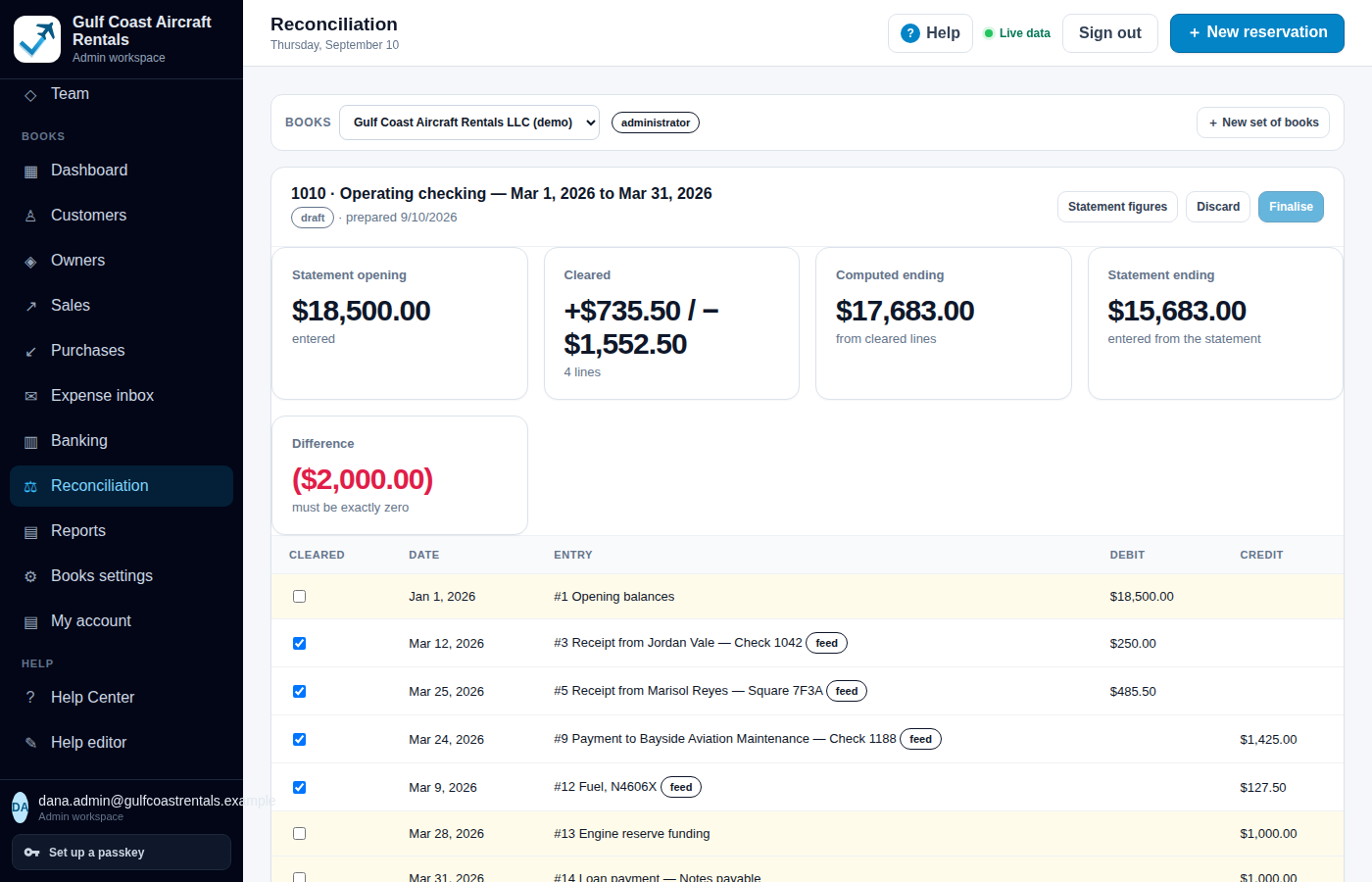
  • Reconciliation with the statement balance entered independently; it finalises only when the difference is zero, and later changes to a cleared line raise a visible exception

Matching and categorisation propose. Not every transaction can be reconciled without someone looking at it, and the module never initiates a payment or a transfer.

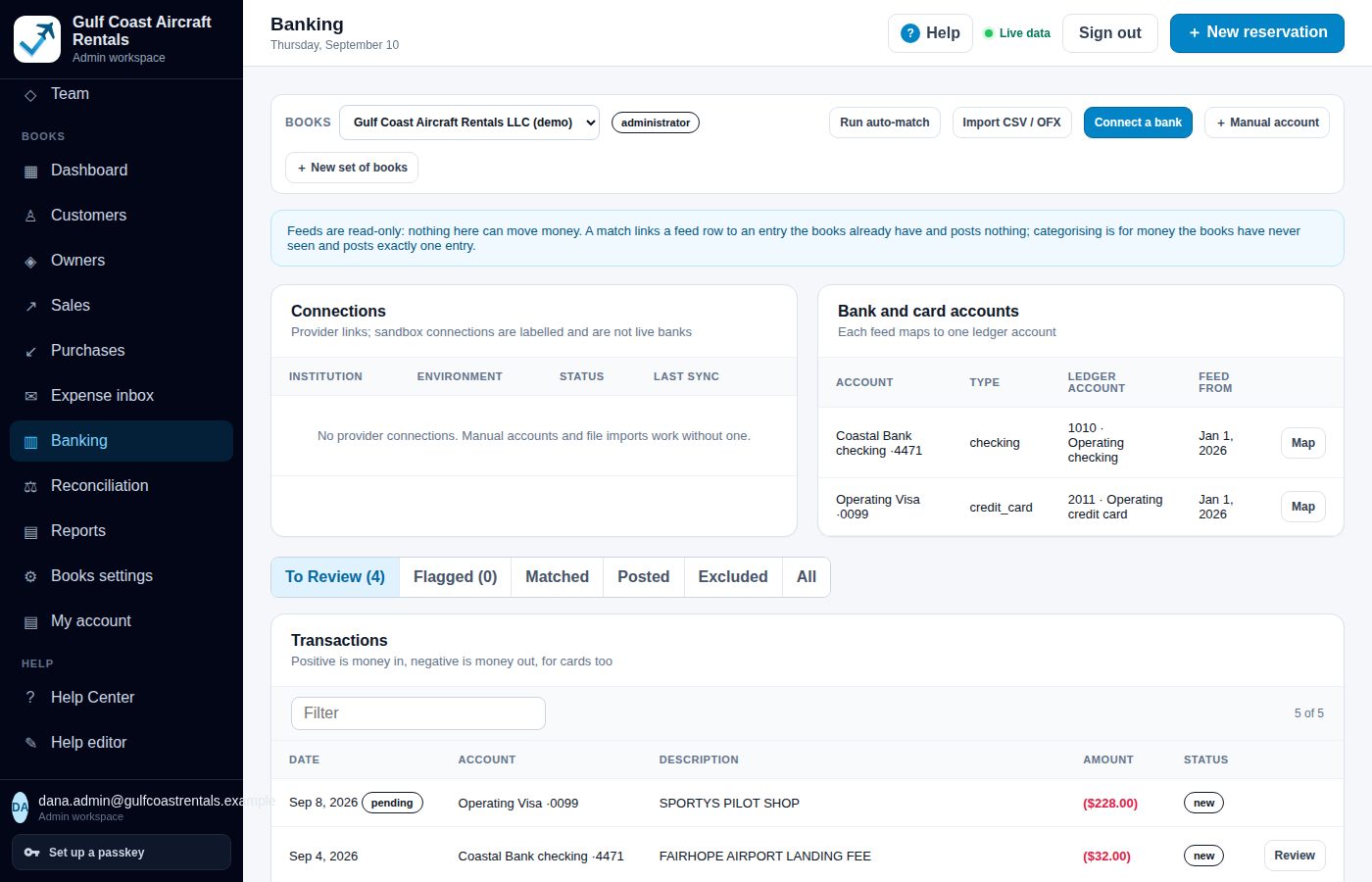
Banking page: Run auto-match, Import CSV / OFX, Connect a bank and Manual account buttons; a note that feeds are read-only and nothing here can move money; connections (none), bank and card accounts mapped to ledger accounts, and a transactions list with To Review, Flagged, Matched, Posted and Excluded tabs.
Reconciliation for an operating checking account, March 2026: statement opening and ending balances entered from the statement, cleared totals, computed ending, a difference of ($2,000.00) that must be exactly zero, and a table of entries with cleared checkboxes.
Banking with manual accounts and file import, and a reconciliation that is still $2,000 from zero.

Receipts and supplier invoices, forwarded and reviewed

Included · preview

Each set of books gets a dedicated intake address. Forwarded receipts and vendor invoices become items with the amount, date, vendor and invoice number extracted, a suggested category and aircraft, and a duplicate check.

  • Only verified senders create items; anything else is quarantined and visible to bookkeepers
  • Extraction states its confidence per field; the default extractor is local and rule-based, so almost everything goes to review
  • The same invoice twice, in another format or through a retried webhook, is recorded once
  • Review decides intent: an unpaid bill, evidence attached to a card charge already in the feed, or a reimbursement request

Requires a receiving email domain configured by the deployment. Image-only receipts are stored and shown for manual entry; no OCR provider is wired in unless an administrator authorises one.

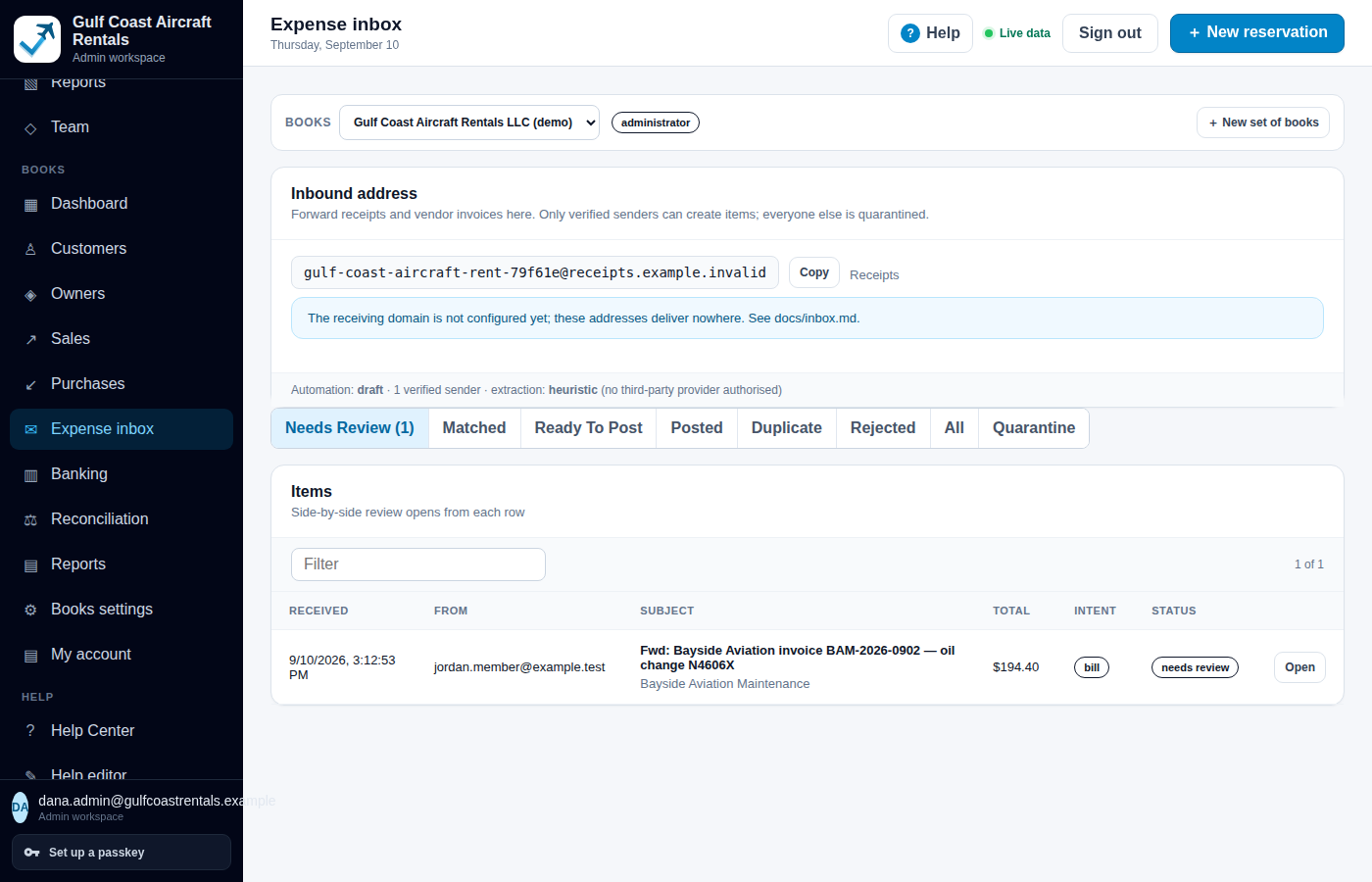
Expense inbox: the dedicated inbound address for a set of books, a note that only verified senders can create items, automation mode draft, and one item needing review, a forwarded vendor invoice for an oil change with its total and intent.
The expense inbox for a fictional operator, with one forwarded vendor invoice waiting for review.

Shared costs and ownership finances that partners can follow

Included · preview

Owners & partners keeps three things apart that are easy to confuse: an owner's share, their book capital, and what they owe or are owed this month.

  • Ownership shares kept by period, so a report as of any past date reads the shares that were true then
  • Contributions, distributions, owner-paid costs and assessments, with a capital roll-forward per owner
  • Reserves as four numbers, target, assessed, designated and cash held, because any two can differ on a given day
  • Allocation rules for profit, fixed costs and assessments, separate from ownership; owner statements; and a My account page that shows each partner only their own figures

A member's spending balance, an owner's ownership percentage and an owner's capital account are three separate concepts here and are never combined. Book capital is not tax-basis capital.

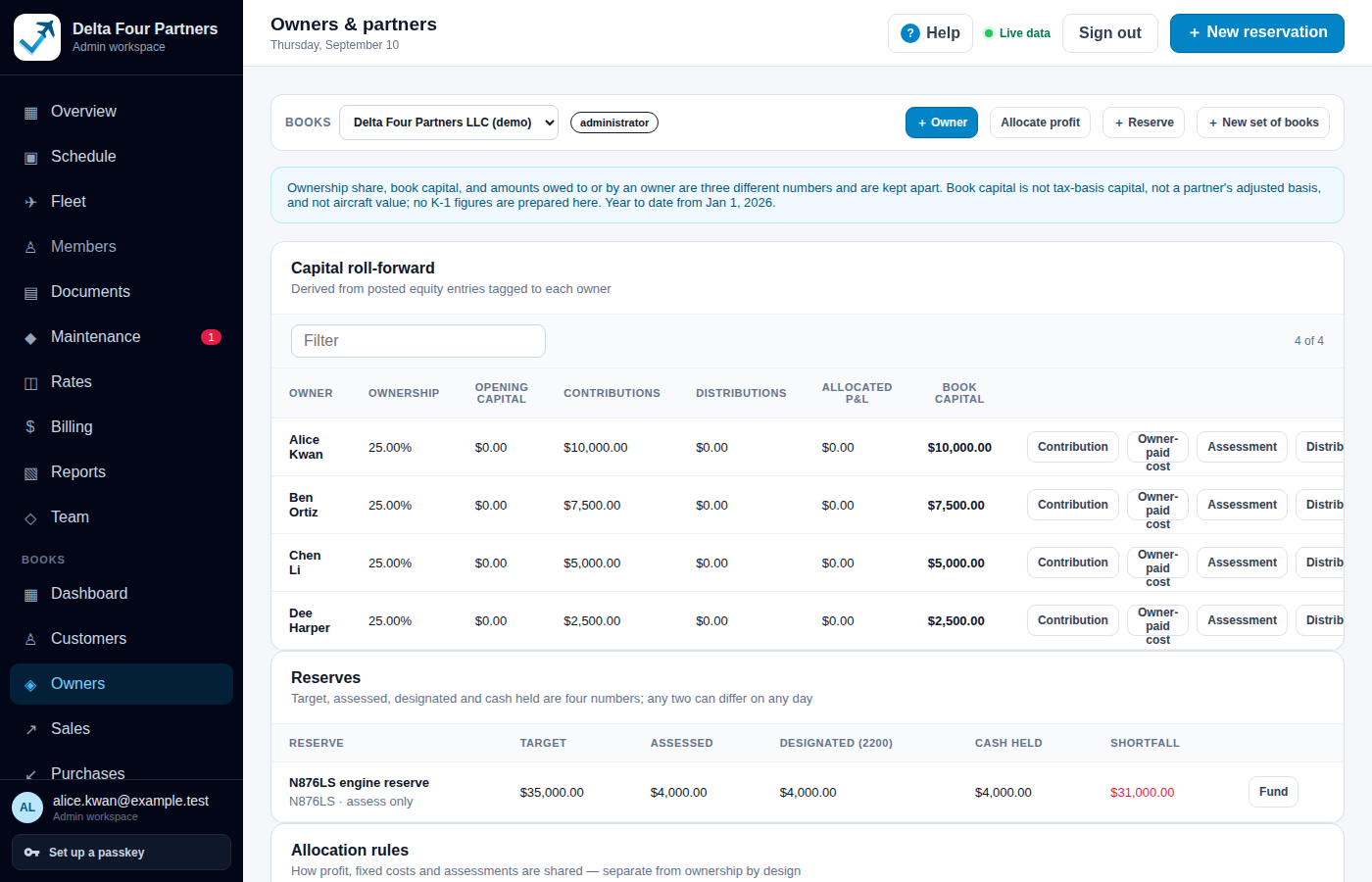
Owners & partners for Delta Four Partners, a fictional partnership: a note that ownership share, book capital and amounts owed are three different numbers; a capital roll-forward table for four owners at 25% each with opening capital, contributions, distributions, allocated P&L and book capital; and a reserves table with target, assessed, designated, cash held and shortfall.
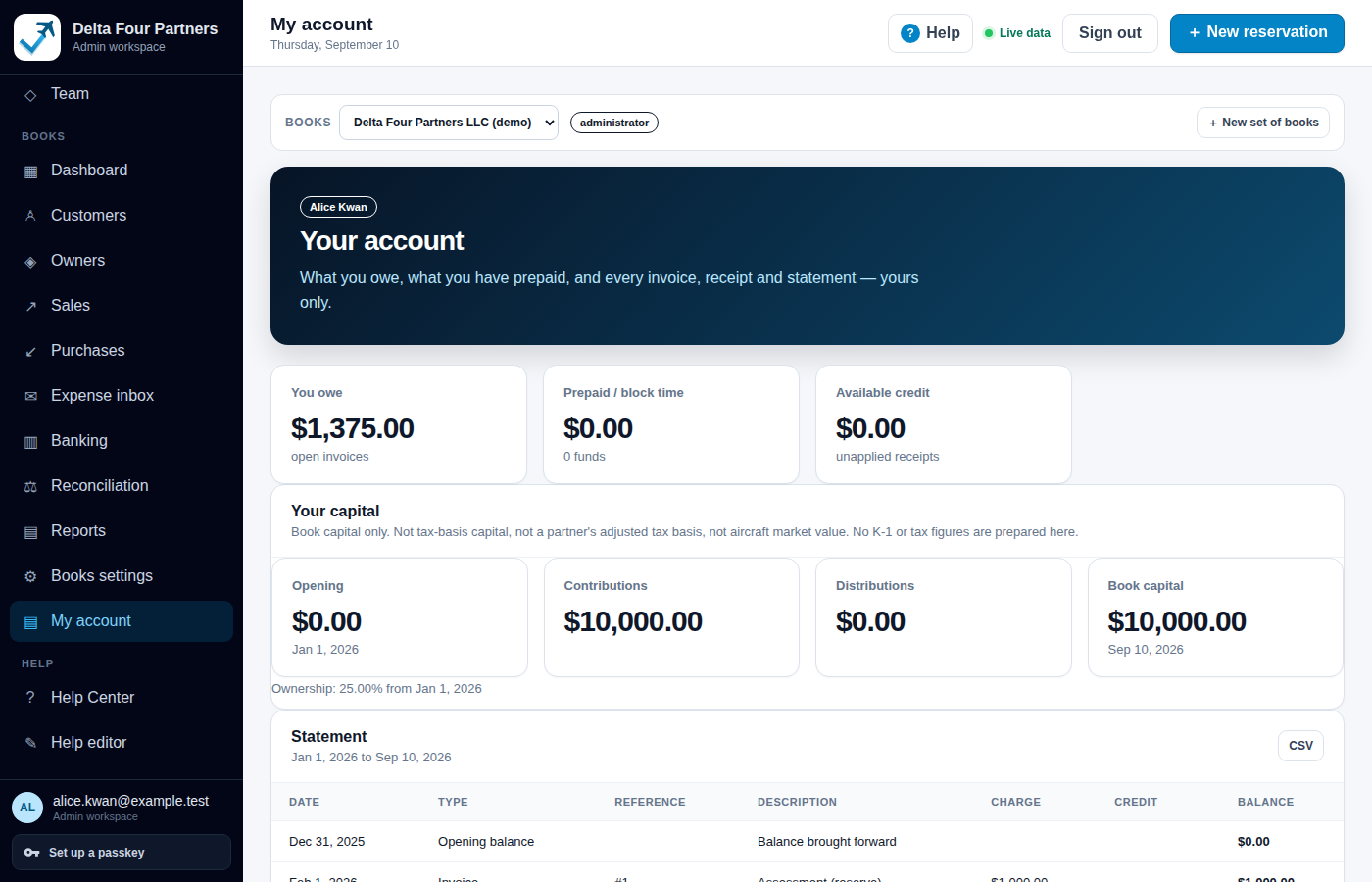
My account for one partner: what they owe, prepaid block time, available credit, their capital (opening, contributions, distributions, book capital) with a note that this is book capital only, and a statement with a CSV button.
Owners & partners for a fictional four-way partnership, and one partner's My account.

See where time and money are going

Available now

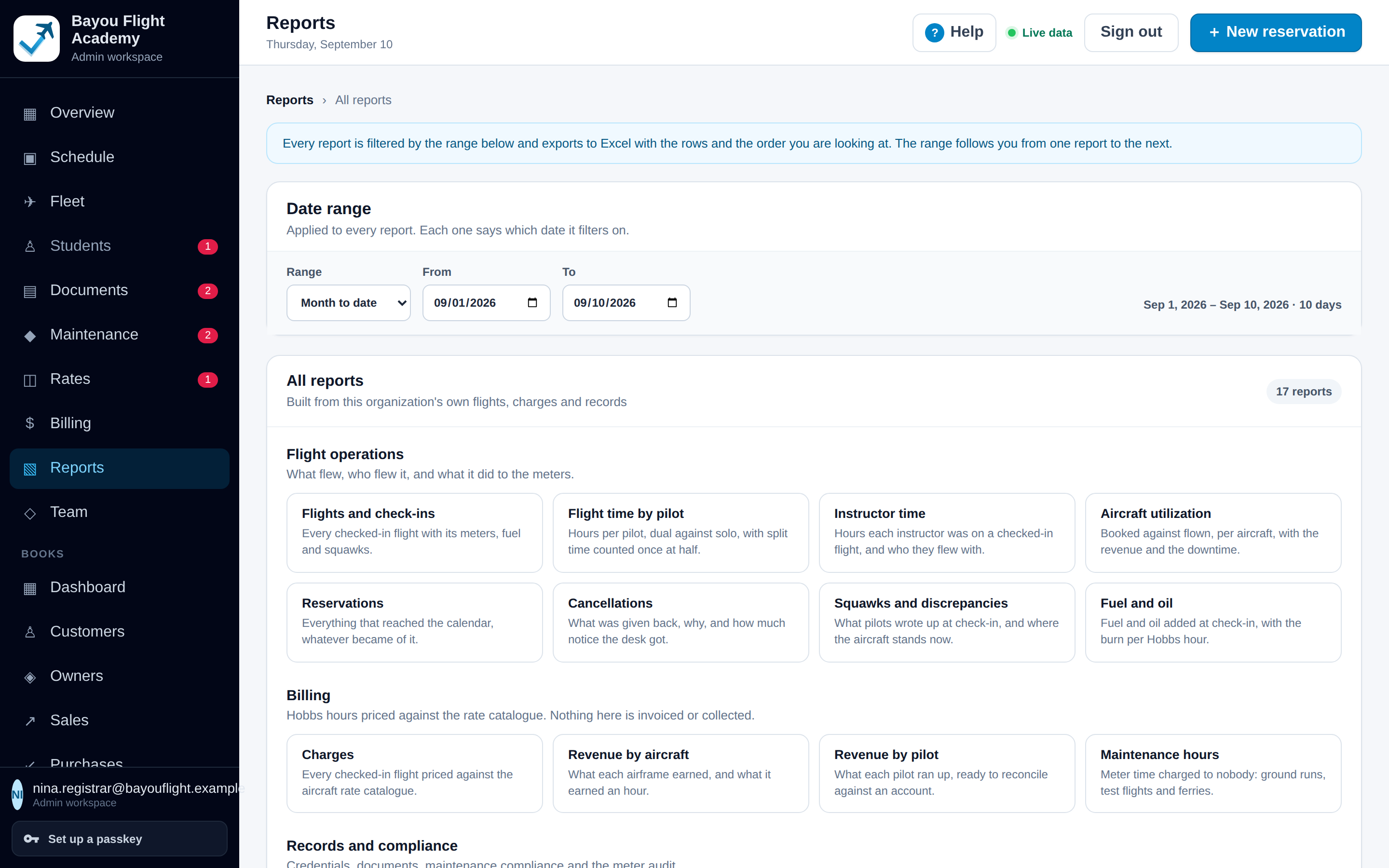
Seventeen operational reports over the organization's own rows, one date range that follows you between them, and every one exporting to a real Excel workbook with typed dates, numbers and money.

  • Flight operations: flights and check-ins, flight time by pilot (dual against solo), instructor time, aircraft utilization, reservations, cancellations, squawks, fuel and oil
  • Billing: charges, revenue by aircraft, revenue by pilot, maintenance hours
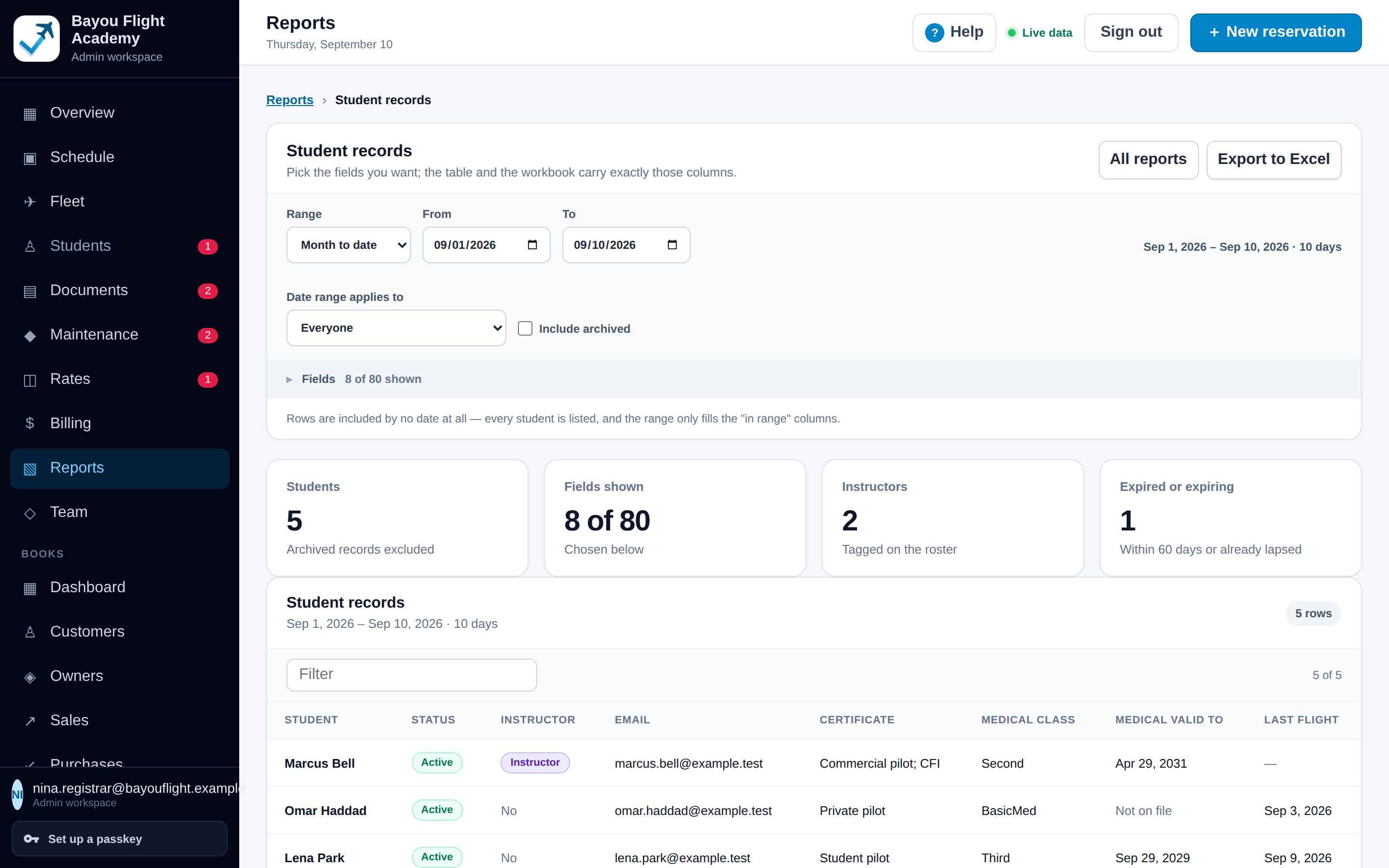
  • Records and compliance: credential expirations, documents, maintenance compliance, the meter audit, and a records report with 80 selectable fields
  • Books reports (preview): income statement with gross profit, the same statement by aircraft with per-hour figures, balance sheet, cash flow, trial balance, receivable and payable aging, owner capital, reserves, budget against actual
Reports index: a date range that applies to every report, then 17 report cards grouped into flight operations, billing, and records and compliance.
Student records report with the field picker open, showing groups of selectable columns and an Export to Excel button.
The reports index for a fictional school, and the records report with its field picker.

Built to be run by the people who fly

Help where the work is, access that follows the organization's roles, and a way in for the records you already have.

Help that knows which screen you are on and who you are

Available now

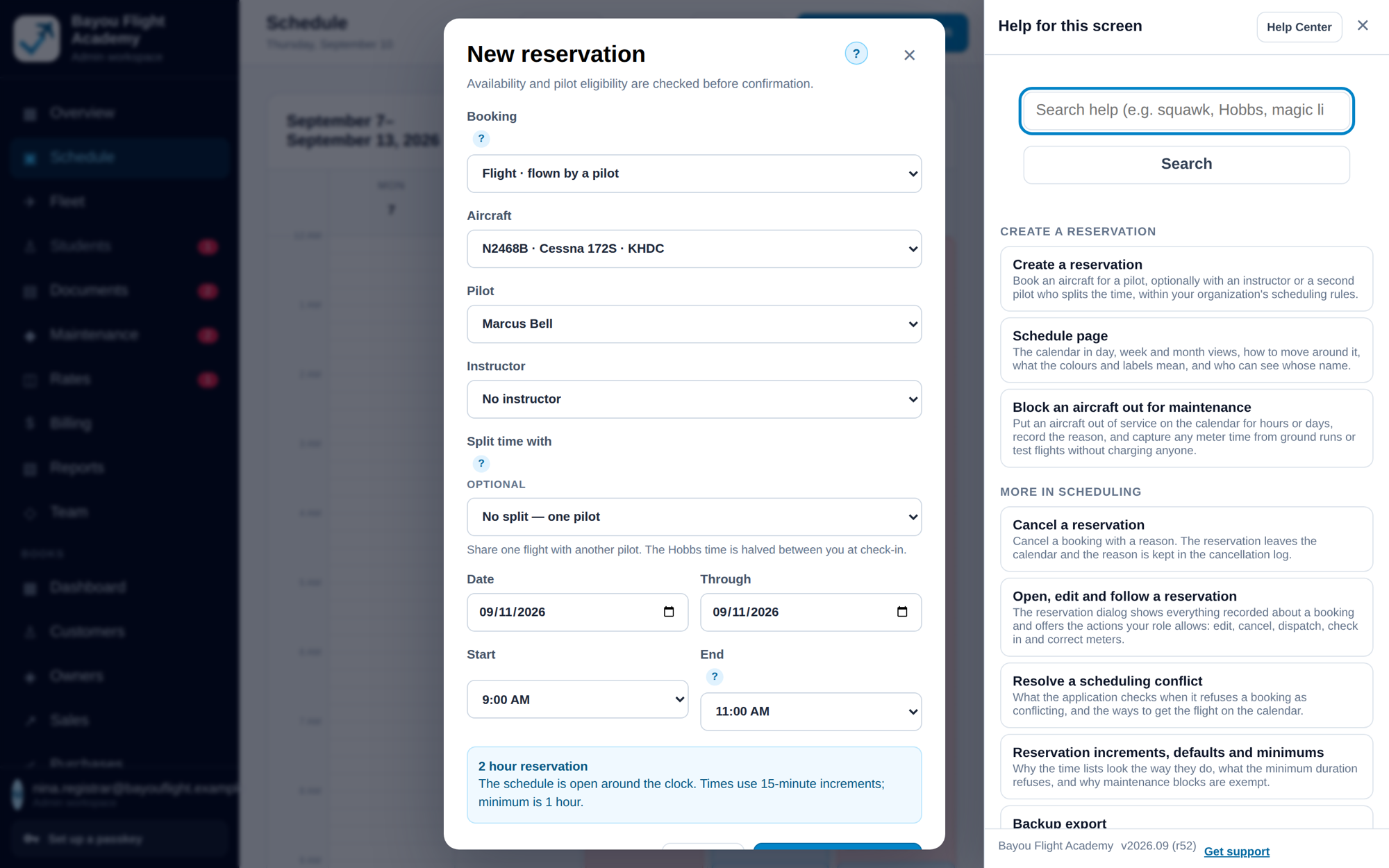
Every screen and dialog has a ? button (or press ?) that opens help beside the work without closing anything. The Help Center adds search, role-based getting-started checklists, guided tours, a glossary and a support route.

  • Written per audience and organization type, and resolved from the signed-in person's real permissions, so nobody sees instructions for something they cannot do
  • Search with typo tolerance and synonyms; searches that find nothing are recorded, sanitized, so the gaps get written
  • Organization administrators can add their own procedures alongside the product help and set the support contact their people see
  • Real screenshots per persona, desktop and phone, regenerated from the same fixtures as the product tests
The New reservation dialog with the help drawer open beside it: a search box, articles for creating a reservation, the schedule page, blocking an aircraft for maintenance, cancelling, resolving a conflict, and a Get support link.
The help drawer beside the New reservation dialog.

One platform, several operating models

Available now

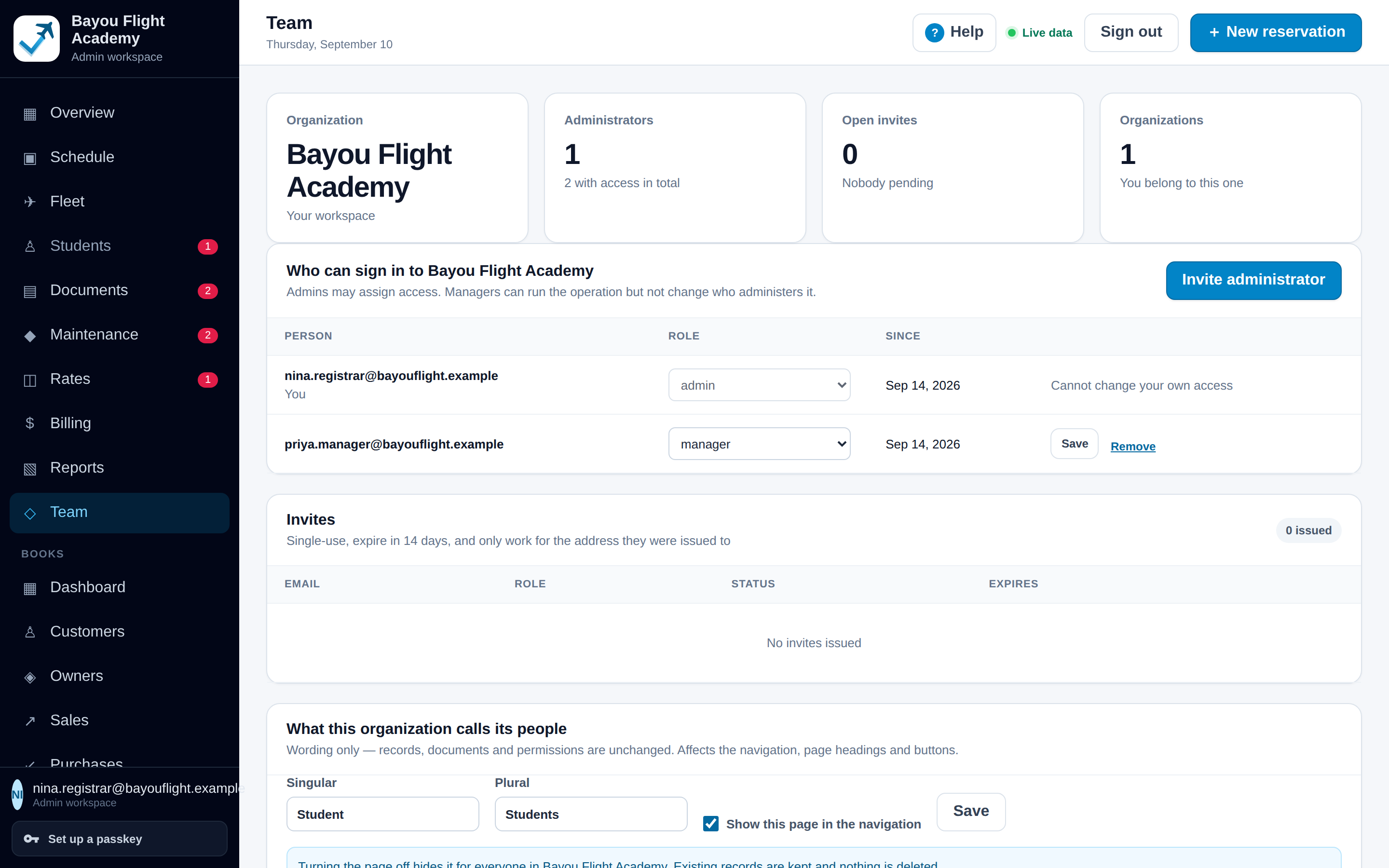
A person can belong to several organizations and switch between them. Each organization sets its type, its wording, its reservation rules and who may do what.

  • Roles: administrator, manager, instructor, bookkeeper, maintenance; pilots, students and members use the portal
  • Staff invitations by link bound to an email address; portal invitations that work once and expire
  • Passwordless sign-in by emailed link, and passkeys (Face ID, Touch ID, Windows Hello, security keys) once enrolled
  • Row-level security in the database on every organization-scoped table, so the server decides what comes back
Team page: members with roles, open invitations, and organization settings including the wording used for people (Students).
Team for a fictional school: members, invitations and the organization's own wording.

Works on a phone, at the aircraft

Available now

Aircraft Steward is a responsive web application. The schedule, dispatch and check-in, the portal's documents and My flights all work at phone width; there is nothing to install.

  • Students and renters upload documents or take a photo of them from the phone's camera
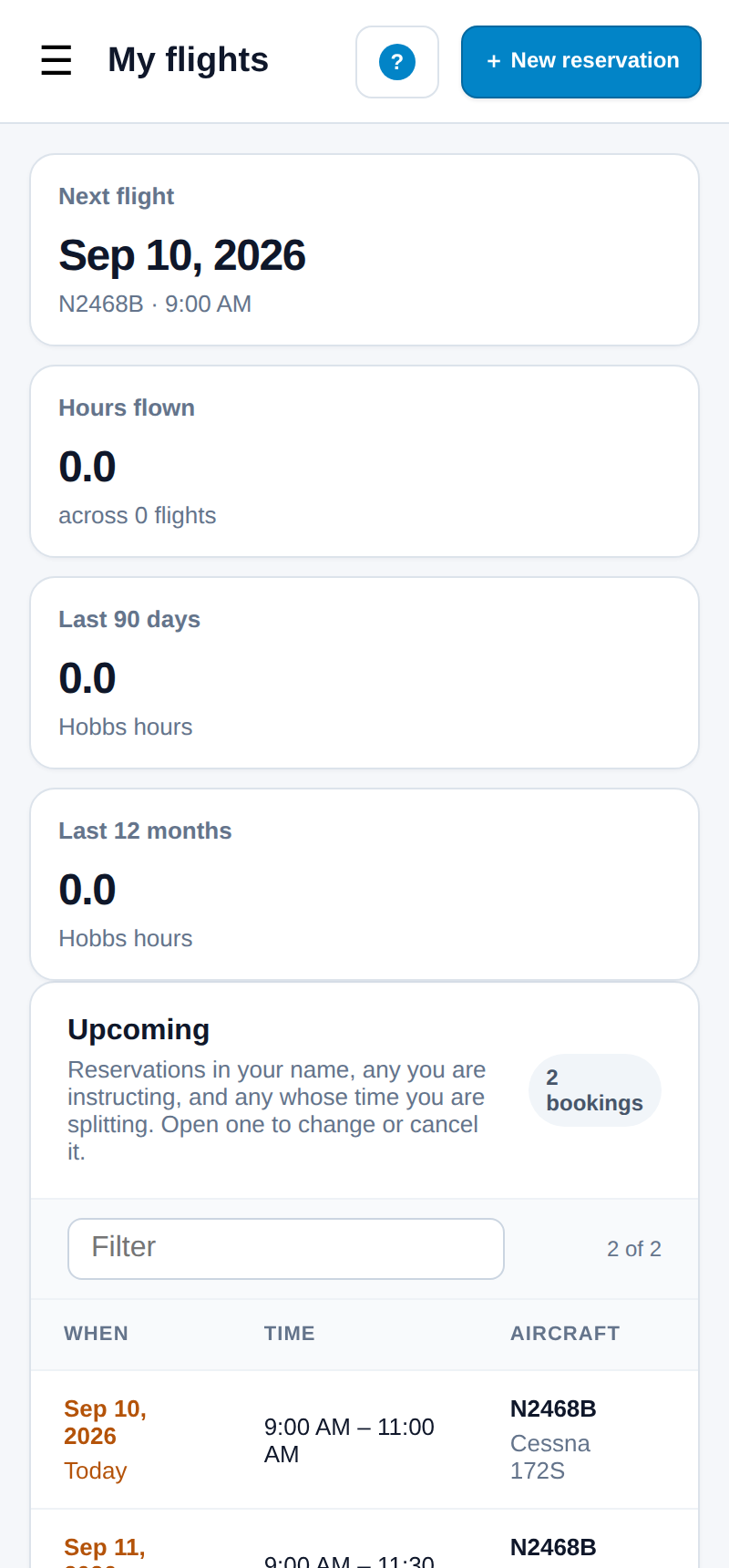
  • My flights on a phone: the next lesson, hours flown, upcoming and completed flights with Hobbs readings
  • Expiry reminders are shown on screen in the roster and the portal
  • Verified announcements, notifications and in-app messaging Planned

There is no native app, and in this release the platform sends no email of its own beyond the sign-in link; staff copy invitation links or open a prepared message in their own mail application.

The same day view at phone width.
My flights on a phone: next lesson, hours flown, upcoming lessons and completed flights with Hobbs readings.
The day view and a student's My flights at phone width.

Bring the records you already have

Available now

Supported imports today are from a Flight Circle export and from your own spreadsheets and bank files. Each import previews before it commits and can be run again without duplicating anything.

  • Flight Circle: a one-time browser extension gathers the files report into per-person folders with a manifest, and the bulk import uploads them, matching folders to people and skipping duplicates
  • The rate catalogue and maintenance reminders from that export arrive with review states, so a person confirms each one
  • Books migration wizard: contacts, an opening trial balance, open invoices and bills, prepaid funds, capital balances and bank accounts as CSV, committed only when every control total agrees Included · preview
  • Bank statement files as CSV or OFX, with the column mapping read from the file and remembered per account Included · preview

Reservations, flight history and balances are not imported; flying starts fresh from the cutover and historical charges belong in the books' opening balances. There is no one-click migration from other platforms and no import is lossless by promise: what needs a person's check is flagged for review on the People, Rates and Maintenance pages.

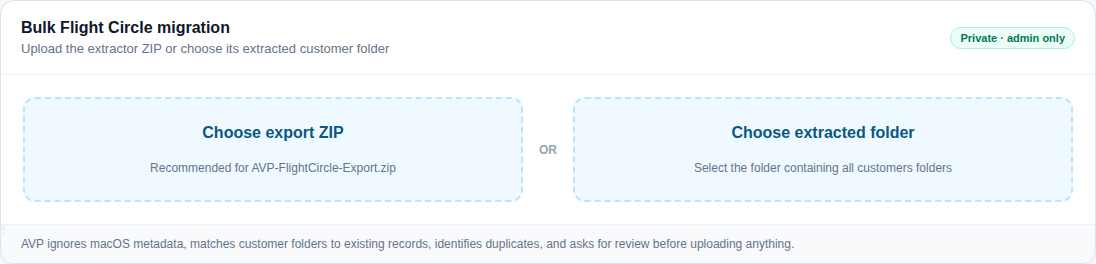
Bulk Flight Circle migration panel: Choose export ZIP or Choose extracted folder.
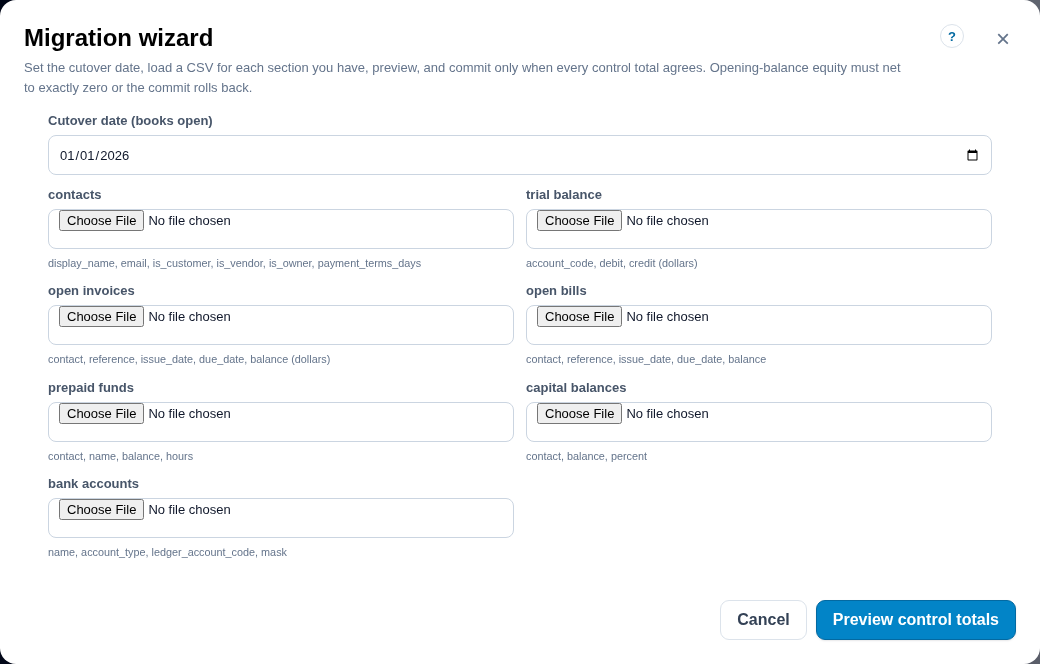
Books migration wizard: cutover date, a CSV file per section, and a control totals table with staged and trial balance figures and an OK column.
The bulk Flight Circle import, and the Books migration wizard's control totals.

One flight, start to finish

What actually happens when a member flies, using only what the product does today. Preview steps are labelled.

  1. Reserve the aircraft Available now

    The member books from the schedule (or the desk books for them). Conflicts with the aircraft or the instructor are refused before the booking saves.

    New reservation dialog with aircraft N2468B, pilot Sam Whitfield and instructor Marcus Bell chosen, date and time fields, and a note reading 2 hour reservation.
  2. Dispatch and check in Available now

    Dispatch pre-fills the Hobbs. At check-in the member or the desk enters Hobbs and tach in, fuel and oil, and any squawk. The aircraft record updates and the change is logged.

    Check-in dialog for N1357D, out at Hobbs 4312.40: fields for Hobbs in, tach in, fuel added, oil added and squawks, and the note Ending meters update the aircraft record.
  3. The charge appears on Billing Available now

    The flight is priced against the aircraft's rate at the time and listed under completed flights. A squawk becomes an open maintenance item.

    Billing page: a note that charges are calculated from checked-in flights and the rate catalogue and nothing is invoiced or collected here; metrics for this month, hours flown, flights missing a rate and rate decisions; a completed flights table priced per Hobbs hour; and a maintenance hours table.
  4. A receipt goes to the expense inbox Included · preview

    If the member bought oil on the way, they forward the receipt to the books' intake address. It becomes an item with the amount and vendor extracted, waiting for a bookkeeper to decide what it is.

    Expense inbox: the dedicated inbound address for a set of books, a note that only verified senders can create items, automation mode draft, and one item needing review, a forwarded vendor invoice for an oil change with its total and intent.
  5. The activity shows up in the reports Available now

    Flight time, utilization, charges and revenue by aircraft are a date range away and export to Excel. In Books (preview), the member's own account page shows what they owe and every invoice and receipt.

    Reports index: a date range that applies to every report, then 17 report cards grouped into flight operations, billing, and records and compliance.

Records are not approved, invoiced or paid automatically at any step. Billing prices the flight; a Books invoice is a separate act by a bookkeeper. No email is sent by the platform beyond the sign-in link.

A closer look

Real screens from the current build, captured against fictional organizations, people and aircraft.

Schedule page, day view, for Bayou Flight Academy, a fictional school: rows for two Cessna 172S and a Piper Warrior, a red maintenance bar across the Warrior's day, and two instructor rows with green availability bands and a purple lesson block.
One row per aircraft and one per instructor. Red is an aircraft in the shop, blocked out for everyone. Available now

Getting started

There is no self-service sign-up in this release. Onboarding begins with a conversation, and the first administrator is invited by us.

  1. Set up the organization

    The first administrator signs in with an emailed link, sets the organization type (flight school, flying club, partnership, rental operator), the wording for people, and invites staff by link. Each staff member picks up a passkey after their first sign-in if they want one.

  2. Aircraft, rates and rules

    Add each aircraft with its base, status and current meters, and the rate catalogue. Reservation increments, defaults and minimums come with sensible defaults.

  3. People and required documents

    Add pilots, students or members, define the documents the organization requires, and send portal invitations. People upload from a phone; staff approve what extraction proposes.

  4. Bring existing records

    Moving from Flight Circle: run the extractor, import the export ZIP, then confirm the rate rows and maintenance items flagged for review. For Books (preview), the migration wizard takes CSVs for contacts, an opening trial balance, open invoices and bills, funds, capital and bank accounts, and commits only when the control totals agree.

  5. Fly

    Book, dispatch, check in. The Help Center's role-based checklists walk each person through their first week, and the ? on every screen answers the question in front of them.

Migration help is hands-on: we walk through the Flight Circle extractor and the import with you, and the flagged-for-review items are yours to confirm. Imports from other scheduling or accounting platforms are not supported in this release.

Responsible by design

The controls that are actually in the product, in plain terms.

Sign-in without passwords

An emailed one-time link, or a passkey once you have enrolled one. There is no password to leak or reuse.

Access follows the organization

Every organization-scoped table is protected by row-level security in the database. A person sees only the organizations they belong to, in the role they hold there.

Documents stay private

Pilot documents are stored in a private, organization-scoped bucket and reached only through the signed-in person's own permissions. Identity-document fields sit in their own report group so nobody exports a licence number without noticing.

Automation proposes; people approve

Document extraction, inbox extraction and bank matching all state their confidence and wait for a review. Records change on approval, not on extraction.

Auditability

Meter changes are written to an append-only audit by the database. In Books, a posted entry can only be corrected by a linked reversal, and every job, webhook and export is logged.

No money moves

Bank and card feeds are read-only, scoped to transactions. Nothing in the platform initiates a payment, a transfer or payroll.

We do not publish uptime commitments, certifications or customer testimonials, because none have been established for this release. What is here is what the product does.

Questions and answers

Who is Aircraft Steward designed for?

Flight schools, flying clubs, aircraft ownership partnerships, and rental or managed fleets. An organization sets its type when it is created, and the interface adapts its wording (Students, Members or Customers), its help and its Books modules to that type. An individual owner or a standalone set of books are supported types too.

Can it support a small partnership as well as a larger fleet?

Yes. The schedule, fleet and records work the same for one aircraft or a fleet, and a person can belong to several organizations and switch between them. The largest fixtures we test against are a multi-aircraft school with several instructors; if your operation is larger than that, tell us the numbers when you get in touch.

How do existing users sign in?

Use the Sign in button at the top of this page. It opens the application's own sign-in screen, where you enter your email for a one-time link, or use a passkey if you have set one up. If you are already signed in on this browser, the button reads Open dashboard and takes you straight to your workspace.

What can be imported from our current tools?

From Flight Circle: customer documents (through the extractor and the bulk import), the rate catalogue, customer records and maintenance reminders, with rows that need a person's check flagged for review. Into Books (preview): contacts, an opening trial balance, open invoices and bills, prepaid funds, capital balances and bank accounts as CSV, and bank statement files as CSV or OFX. Reservations, flight history and balances are not imported; flying starts fresh from the cutover date. There is no import from other scheduling platforms in this release.

How do customer documents and extraction review work?

A pilot or student uploads a document from the portal, or staff upload on their behalf. Extraction proposes values (certificate, ratings, medical class and date, expiry dates) with a confidence score. A staff member compares the proposal with the file and approves or rejects it with a reason. Only an approval changes the person's record, and the record can be rebuilt from approved documents at any time.

Can it be used on a phone or tablet?

Yes. It is a responsive web application; there is nothing to install. The schedule, dispatch and check-in, the portal's document upload with camera capture, and My flights all work at phone width. There is no native app in this release.

How do roles and organization access work?

Staff roles are administrator, manager, instructor, bookkeeper and maintenance; pilots, students and members use the portal. Administrators invite staff by a link bound to an email address and send portal invitations to people. Books has its own roles (administrator, accountant, reviewer, owner, member, auditor) because a managing partner is often an administrator and an owner, and those grant different things. Access is enforced in the database, not only in the interface.

Which accounting and bank features are available?

Books is included and labelled a preview. It has a double-entry general ledger, customer and member invoicing with partial payments, credits, prepaid block time, recurring dues and statements, vendors and bills, owner equity and reserves, and financial reports. Bank and card feeds are read-only through Plaid once the deployment supplies credentials; statement files can be uploaded by hand as CSV or OFX without any provider. Matching proposes links and a person reviews them; reconciliation finalises only at an exact zero difference. Books does not move money, file taxes or produce K-1 figures, and an accountant should validate the setup before an organization relies on it.

Is QuickBooks required, or supported?

Neither. Aircraft Steward has no QuickBooks integration and no accounting-software connector in this release. Books is built in, and its reports export to CSV; the operational reports export to Excel. If you keep your books elsewhere, you can use the scheduling, dispatch, records, maintenance and billing side without Books at all.

What setup or onboarding support is offered?

Onboarding is done with us, not self-service: we create the organization, invite the first administrator, and walk through the Flight Circle import and the initial configuration together. Inside the product, the Help Center has role-based getting-started checklists and guided tours, and every screen has contextual help. Organization administrators can add their own procedures beside the product help.

What does it cost, and when is it available?

Pricing is not published on this page. Aircraft Steward is in use by its first organizations, and we take on new organizations through a conversation. Use Request a demo and tell us your organization type and fleet size.

See it on your own fleet

Tell us what kind of operation you run and how many aircraft, and we will walk you through the product on fictional data, then talk about bringing your records across.

Or write to info@aircraftsteward.com.

Already using Aircraft Steward? Sign in

Request a demo

This form composes an email to us in your own mail application; nothing is stored on this site. If your mail application does not open, write to the address below.